How to Write an RFP for Custom eLearning Development

An eLearning development RFP should be a short brief plus a scoring sheet. State the audience, outcome, volume, tools, LMS and timeline, then score three to five vendors on written answers, a work sample and references.

For an L&D Manager at a 3,000-person company with a Q1 deadline and a procurement team, that means six to ten pages, not forty.

The shortlist matters more than the paperwork. 6sense’s 2025 Buyer Experience Report, drawing on nearly 4,000 buyers, found they purchased from a vendor on their Day-One shortlist 95% of the time.

Short answer
Send the RFP to three to five firms, not twenty, and ask for a work sample, named designers and references alongside the price. Score every response on a sheet you wrote before the answers arrived. End with a small paid pilot before the full statement of work.

TL;DR

  1. An eLearning development RFP is a brief plus a scoring sheet, not a legal document.
  2. It matters to L&D Managers and procurement leads running a formal vendor process.
  3. Send it to three to five firms; more bids add reading time, not insight.
  4. Weight the scoring sheet to risk: who builds it and comparable work outweigh price.
  5. Ask vendors to show a work sample and name the designers before they quote.
  6. Add a small paid pilot between scoring and the full statement of work.
  7. A single short course rarely needs a formal RFP.

>> See what finished work looks like when one team scopes, builds and delivers a 90-hour course

Table of Contents

1. What an eLearning Development RFP Should Contain

2. A Scoring Sheet That Weights Risk, Not Price

3. Why RFPs Reward the Wrong Vendors

4. What to Ask Vendors to Show, Not Tell

5. Six Steps From Brief to Statement of Work

6. Add a Small Paid Pilot Before You Sign

7. What Procurement Will Ask For

8. Where an RFP Does Not Help

9. FAQ

What an eLearning Development RFP Should Contain

An RFP for custom eLearning is a brief that vendors can answer in writing. Keep it to the facts a designer needs to scope the work, plus the questions that separate one vendor from another.

Procurement teams often add commercial terms around it. Those belong in an appendix, so the learning brief stays readable by the people who must judge the answers. Our guide to custom eLearning development companies can help you build the long list.

SectionWhat to writeWhy it matters
Background and outcomeThe business problem and what learners must do differentlyLets vendors propose a design, not only production
Audience and volumeRoles, number of learners, locations, languagesDrives complexity level and localisation
ScopeCourses, finished hours, complexity level, tool if fixed (Storyline or Rise)Makes quotes comparable
TechnicalLMS, SCORM 1.2 or xAPI, accessibility target (WCAG 2.2 AA)Avoids launch-week surprises
TimelineLaunch date, SME availability, review windowsTests whether a vendor’s plan is real
Response formatPage limits, a work sample, named team, references, price per finished hourKeeps answers comparable

A Scoring Sheet That Weights Risk, Not Price

Write the scoring sheet before the responses arrive. Weight each criterion by the risk it carries, then score every vendor from 1 to 5.

The worked example below uses seven criteria that mirror what buyers argue about. The weighted score is the sum of weight times score, divided by five, so the total is out of 100. Vendor Y has the cheapest bid and the strongest portfolio, and it still ranks second.

CriterionWeightVendor XVendor YVendor Z
Who builds it20523
Instructional judgment20433
Comparable work15453
Cost per finished hour15354
Scope-change handling10432
LMS testing10534
Data and AI handling10342
Weighted score, out of 100100817061

Vendor Y scored 5 on cost and 5 on comparable work, yet came second. The people building the course and the quality of its scope handling counted for more, because they carry more of the delivery risk.

Why RFPs Reward the Wrong Vendors

The assumption is that more bidders produce a better price and a better course. The reality is that more bidders produce more proposals to read and more handovers hidden inside the price.

Fifteen responses can cost an L&D team weeks of reading. That is time not spent on the approval that follows. Rise Up’s 2025 State of Learning report found that 40% of 300 senior UK L&D professionals say fewer than half of their initiatives are approved.

Price is also not the only driver. In Deloitte’s 2024 Global Outsourcing Survey of more than 500 executives, skilled talent and agility joined cost reduction as key drivers. A short list of three to five firms lets you judge the people, which a long list cannot.

What to Ask Vendors to Show, Not Tell

Ask for evidence in the response, not claims. A work sample, a named team and a reference tell you more than a capability statement.

  • A finished sample from comparable work, at the same complexity level.
  • The named designers, and who builds the course in the authoring tool.
  • A reference you can call, ideally from a similar audience size.
  • How they test SCORM or xAPI tracking in your LMS before launch.
  • Who owns the source files when the project ends.
  • What AI does in their process, and whether your content enters a language model.

Comparable work is the buyer-scorecard criterion this list answers. Ask for finished work at the same complexity level, for a similar audience and in your tool, and ask who built it. A portfolio of Level 1 courses says little about a Level 3 simulation.

Six Steps From Brief to Statement of Work

A short RFP follows six steps, and the order matters. Write the brief, shortlist three to five firms, issue the RFP and collect written answers. Then score samples and references, and run a paid pilot before the full statement of work.
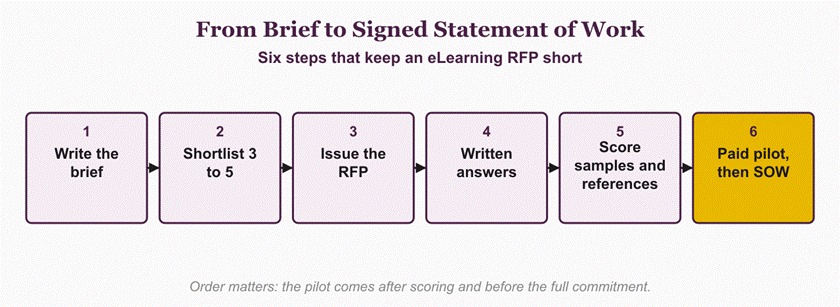
Six steps from brief to statement of work: write the brief, shortlist three to five firms, issue the RFP, collect written answers, score samples and references, run a paid pilot. Alt text: Six boxes joined by arrows, the last box in gold.

The diagram shows the same sequence. The gold box marks the step most RFPs skip, which is the paid pilot between scoring and signing.

For an L&D Manager, the practical gain is time. Steps one to three take the same effort whether you send three RFPs or fifteen, and steps four to six get easier with fewer responses.

Add a Small Paid Pilot Before You Sign

A pilot is one short module or a storyboard plus a few built screens, priced separately, with a go or no-go point. It tests what a proposal cannot: how the vendor works with you.

  1. Can the designer who scoped the work also build it?
  2. How do they handle SME input and conflicting feedback?
  3. Do review rounds stay inside the plan?
  4. Does the module track correctly in your LMS?

Keep the pilot small, so a failed pilot costs little. A vendor who resists a paid pilot is telling you something about how they expect the full project to go.

>> Send Peter your draft brief and get a plain read on what vendors will ask next

What Procurement Will Ask For

Procurement teams usually need a standard set of documents before they can approve a vendor. Agree the list in week one, not after the vendor is chosen.

Documents procurement commonly requests from an eLearning vendor

  • Company registration and tax details.
  • Insurance certificates, including professional indemnity cover.
  • A data protection and AI-use policy.
  • An accessibility statement, ideally against WCAG 2.2 AA.
  • A source-file ownership and IP clause in the statement of work.
  • References from comparable clients.

Ask each vendor for these with their response. A vendor who can send them in a day has done this before, and one who cannot may take weeks after you have chosen them.

Where an RFP Does Not Help

A formal RFP is the wrong tool for a single short course. A one-page brief and two sample reviews will tell you the same things in a week.

Where this doesn’t apply

VonGeyer answers RFPs for custom programmes, but a small senior team is the wrong fit for a 10,000-seat programme needed in three weeks. Translation is priced separately, and we do not run live facilitation or build native mobile apps. A single rapid course is often better served by a templated build.

What Changes When the RFP Is Short

A short RFP with a weighted scoring sheet and a paid pilot gives an L&D Manager a vendor decision they can defend to procurement. It also protects the timeline, because three or four serious responses can be read in days.

>> Talk to Julian about turning your brief into a shortlist-ready RFP

FAQ

What should an eLearning RFP include?

It should include the business outcome, audience and volume, and scope in finished hours. Add technical requirements such as LMS and SCORM or xAPI, the timeline and a response format. Ask for a work sample, named designers, references and price per finished hour, and keep it to a few pages.

How many vendors should receive an eLearning RFP?

Three to five is enough. A longer list adds reading time without adding insight, and the best vendors may decline a crowded process. Build the list from referrals and finished work, not from directories alone.

What are good evaluation criteria for choosing an eLearning vendor?

Score who builds the course, instructional judgment, comparable work, cost per finished hour, scope-change handling, LMS testing and data and AI handling. Weight them by risk and write the sheet before responses arrive. Price should count, but it should not outweigh the people doing the work.

How long should vendors have to respond to an RFP?

Two to three weeks is a workable window for a short RFP. A shorter window favours firms with ready-made templates, and a longer one rarely improves the answers. Allow time for a clarification round.

Should an eLearning RFP ask for pricing?

Yes, but ask for price per finished hour at a stated complexity level, with exclusions listed. That makes quotes comparable. Avoid asking for a single fixed total until scope is clear.

Who Owns Your eLearning Source Files? A Contract Guide

Unless your contract says otherwise, the vendor who built your course may own the editable source files. You may hold only the published package that runs in your LMS.

In US law, a contractor’s work generally stays with the contractor unless a signed agreement assigns it. A narrow work-made-for-hire exception also needs a signed agreement.

For a Director of Programs at a certification body inheriting 40 courses from a closed agency, that gap decides whether the catalogue can be updated. Vendor changes become likelier when budgets tighten.

ATD’s 2026 State of the Industry report found 28% of talent development leaders expect more resources, down from 48% a year earlier. This guide is practical, not legal advice.

eLearning source files (definition)
eLearning source files are the editable project, such as a Storyline file or a Rise 360 course, with its scripts, audio, graphics and review comments. The published SCORM or xAPI package is the output. The source files are what let anyone change the course afterwards.

TL;DR

  1. Source files are the editable project; the published SCORM or xAPI package cannot be edited.
  2. It matters to Directors of Programs and L&D Managers who must update courses after a vendor leaves.
  3. In US law, a contractor’s work generally stays with the contractor unless a signed agreement says otherwise.
  4. Put five clauses in the contract: ownership, delivery, right to modify, third-party licences and payment tied to delivery.
  5. Rise 360 courses live in an Articulate 360 account and transfer one course at a time, per Articulate’s community.
  6. The US Copyright Office’s January 2025 report says prompts alone are not authorship, so ask vendors where humans wrote and checked.
  7. Collect all three layers of the file set before ending any vendor relationship.

>> See how a 90-hour course was designed, built and delivered into the client’s own LCMS

Table of Contents

  1. What You Actually Receive at Handover
  2. What the Law Says by Default
  3. Five Clauses to Put in the Contract
  4. Tool Traps: Storyline and Rise
  5. What to Collect When You Switch Vendors
  6. What This Doesn’t Include
  7. FAQ

What You Actually Receive at Handover

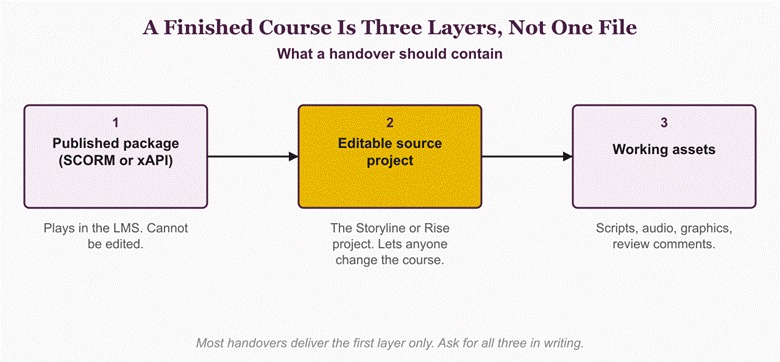
A finished course is three layers, and most handovers deliver only the first. The published package plays in your LMS but cannot be edited. The editable source project and the working assets are what let you change the course later.

A finished course is three layers: the published package, the editable source project and the working assets. Alt text: Three boxes in a row, the middle box (editable source project) in gold.

The diagram shows three layers. Layer one is the SCORM or xAPI package your LMS runs, and layer two, in gold, is the editable Storyline or Rise project. Layer three is the scripts, audio, graphics and review comments behind them.

A course with only layer one is a closed box. Fixing a single wrong figure then means rebuilding the module, or asking the original vendor for a favour.

What the Law Says by Default

In the US, the person who creates a work owns it unless a written agreement says otherwise. For commissioned work by an independent contractor, the US Copyright Office’s circular on works made for hire explains the exception. It applies only to certain categories of work, and only when both parties sign a written agreement saying so.

Assignment is the usual route. The contract states that the client owns the deliverables on payment, or holds a perpetual licence to edit them. Rules differ outside the US, so ask your counsel before you rely on any default.

AI adds a second question. The US Copyright Office’s Part 2 report, released 29 January 2025, found that prompts alone do not make a user the author of AI output. Human authorship is required, so ask vendors to show where designers wrote and checked each element.

Five Clauses to Put in the Contract

Put the clauses in the statement of work, not in an email. Each one closes a specific gap.

ClauseWhat to writeWhat goes wrong without it
Ownership or assignmentThe client owns all deliverables on payment, or holds a perpetual licence to editThe vendor keeps rights and you can only run the course
Delivery of source filesEditable projects, scripts, audio and graphics delivered with the final packageYou hold a package nobody can change
Right to modifyYou or any vendor may edit and republishA new vendor must rebuild from scratch
Third-party assetsLicences for stock music, fonts and images are stated and transferableThe course breaks when a licence lapses
Payment tied to deliveryThe final payment falls due only after all source files arriveYou lose negotiating power at handover

Source-file ownership is the buyer-scorecard question this table answers. A good vendor will agree to all five without negotiation, because a course the client can maintain is also one that keeps the relationship open.

>> Send us the file-ownership clause from your current contract and get a plain-language read

Tool Traps: Storyline and Rise

The tool you build in changes what “handing over the file” means. Storyline saves a project as a file that can be sent or shared. Rise 360 courses live inside an Articulate 360 account, so a handover is usually a transfer between accounts.

From the desk

Per Articulate’s own community answers, Rise ownership transfers need Articulate 360 Teams accounts on both sides and move one course at a time. Sending a copy gives the new owner a separate copy, not a transfer. Confirm the current rules with Articulate Support before relying on them.

Articulate’s community discussion on transferring Rise courses between accounts shows how often this catches teams out. If you are still choosing a tool, our comparison of Storyline and Rise covers the trade-offs.

What to Collect When You Switch Vendors

Collect the full file set before you end the relationship, and before you stop paying. Ask for these seven items in writing.

  1. The editable project for every course, in the tool version used.
  2. Scripts and storyboards.
  3. Audio files, with the voice licence terms.
  4. Graphics and fonts, with their licences.
  5. The SCORM or xAPI package for the live version.
  6. The review comments and approval log.
  7. A list of tools and versions used to build each course.

Open one course in the tool yourself before you sign off. A file that will not open is a file you do not have. For white-label resellers the same checklist applies, and our guide to white label course development covers the agreement terms.

What This Doesn’t Include

This guide is a checklist, not legal advice, and VonGeyer is not a law firm. It covers the US default and does not replace your counsel’s review of your own contract.

  • It does not cover learner records, which belong to a separate data contract with your LMS vendor.
  • It does not cover content built inside a vendor’s proprietary hosted platform, where a source file may not exist.
  • It does not settle ownership of AI-assisted material, where the law is still developing.

Where this doesn’t apply

If a vendor authors in a closed platform, ask for an export format and test it before you sign. Outside the US, ownership and moral rights work differently, so check local law. Our position is that you should be able to edit what you paid for, and any statement of work should say so.

What Changes When You Own What You Paid For

A team that owns its source files can fix a figure in a day and move vendors without a rebuild. A catalogue then survives any single supplier leaving. For a Director of Programs, that is the difference between a catalogue and a pile of packages.

>> Talk to Julian about a statement of work that puts source-file delivery in writing

FAQ

Who owns the eLearning course I paid a vendor to build?

It depends on your contract, and in the US a contractor’s work generally stays with the contractor unless a signed agreement assigns it. A narrow work-made-for-hire exception also needs a signed agreement. Put ownership or a perpetual licence to edit in the statement of work.

Can a vendor refuse to hand over source files?

If the contract does not require delivery, yes, a vendor can decline or charge for them. Some vendors sell source files as an add-on. Write delivery of editable files into the contract and tie the final payment to it.

What is the difference between SCORM and source files?

A SCORM or xAPI package is the published output that plays in your LMS and records completion. Source files are the editable project, such as a Storyline file or a Rise course, from which the package is made. Without the source, you can run the course but not change it.

How do I transfer a Rise 360 course to a new vendor?

Rise courses live in an Articulate 360 account. Per Articulate’s community answers, ownership can transfer between Teams accounts one course at a time, and an admin can move all of a member’s courses. Check current rules with Articulate Support, because a sent copy is not a transfer.

Do AI-generated course materials have copyright protection?

In the US, the Copyright Office’s January 2025 report concluded that prompts alone do not make a user the author of AI output. Human authorship is required for protection. Ask your vendor to show where designers wrote, selected and checked each element.

ILT to eLearning Conversion: Process, Cost and Where to Start

ILT to eLearning conversion turns an instructor-led course into self-paced online learning by redesigning it, not by uploading the slides. The facilitator’s explanations, the group practice and the room discussion all need a digital replacement, or the learning they carried disappears.

For an L&D Manager with forty classroom decks and a mandate to move them online, the first decision is which courses deserve conversion at all.

Budgets make that choice sharper. ATD’s 2026 State of the Industry report puts average direct learning spend at $846 per employee in 2025. It cites greater use of virtual classrooms among the reasons.

Conversion can save travel and seat time. It only saves money if the converted course still works.

ILT to eLearning conversion (definition)
ILT to eLearning conversion is the redesign of an instructor-led course into self-paced digital learning. It replaces what the facilitator did, explaining, demonstrating, correcting and prompting discussion, with structured content, practice and feedback. The result is published to an LMS as SCORM or xAPI.

TL;DR

  1. ILT to eLearning conversion is a redesign of the course, not a transfer of the slides.
  2. It matters to L&D Managers and Directors of Programs moving classroom catalogues online.
  3. Slides carry only part of the learning; the facilitator carried the rest.
  4. Convert first the courses with stable content, many learners and repeat delivery.
  5. Industry benchmarks run from about $14,300 to $71,500 per finished hour, by complexity.
  6. Ask any partner five questions, including how they test tracking in your LMS.
  7. Some courses should stay in the classroom, and an honest partner will say which.

>> See how a 90-hour licensure course was rebuilt and delivered into the client’s own LCMS

Table of Contents

1. What Changes When a Classroom Course Goes Online

2. Why Converting the Slides Usually Fails

3. Which Courses to Convert First

4. Questions to Ask Any Learning Partner Before a Conversion

5. What Conversion Costs, and What Drives It

6. When to Keep a Course in the Classroom

7. FAQ

What Changes When a Classroom Course Goes Online

Everything the facilitator did must be designed into the course. In a classroom, a trainer explains, checks understanding, fixes mistakes and runs discussion. Online, each of those becomes a deliberate design element, or it is lost.

That is why a training manager cannot judge a conversion by its slide count. The table shows what each classroom element becomes when it moves to self-paced eLearning.

Classroom elementWhat it becomes in eLearningWhat gets lost if skipped
Facilitator explanationShort narrated segments, worked examplesContext and emphasis
Questions from the roomAnticipated-question callouts, FAQsClarity on the hard parts
Group activityScenario or branching practiceApplication of the skill
Trainer correcting errorsFeedback on every practice answerLearning from mistakes
HandoutsDownloadable job aidsSupport back on the job
End-of-day testKnowledge checks spread through the courseRetention over time

Vendors who quote only for “converting the deck” are pricing the first column and skipping the second. Ask to see the second column in their scope.

Why Converting the Slides Usually Fails

The assumption is that conversion means turning slides into screens. The reality is that slides carry only part of the learning, and the facilitator carried the rest.

A deck built for a trainer is a set of prompts, not a course. Strip away the person and the learner gets headings without the explanation, and activities without the feedback.

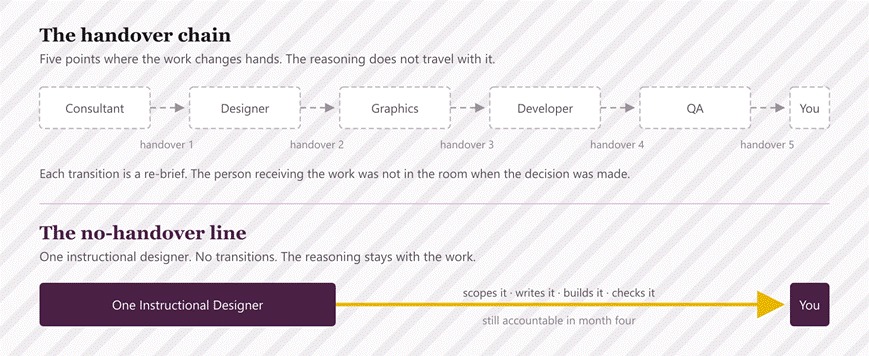
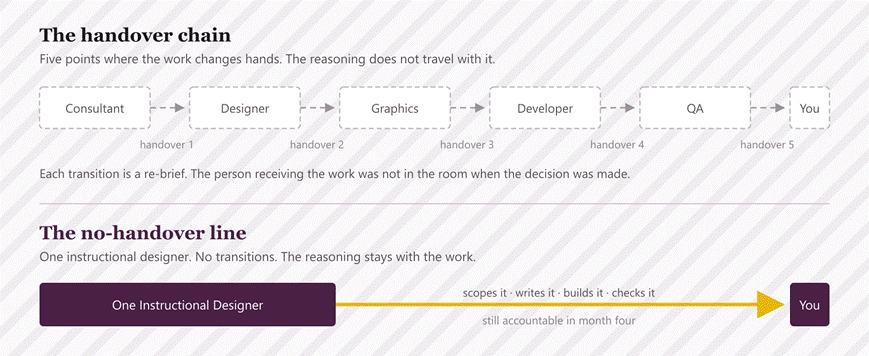
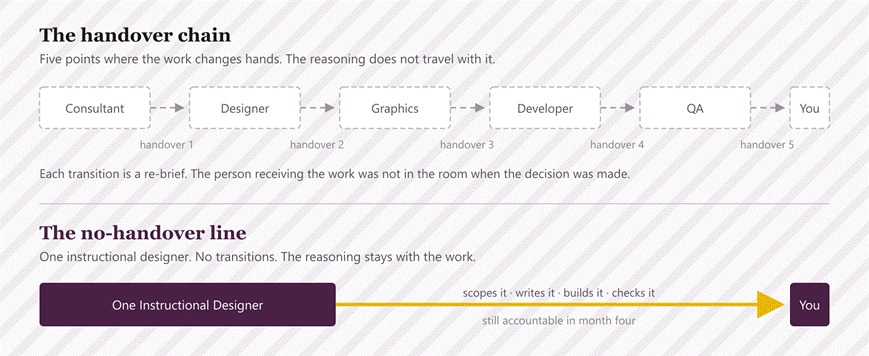
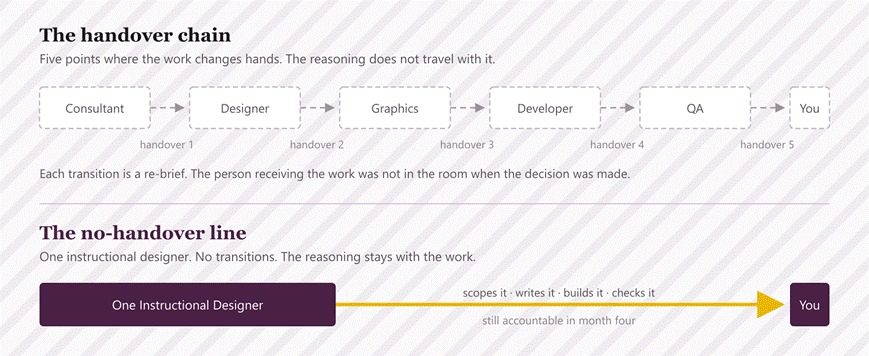
Conversion also fails through handovers. One person analyses the workshop, another writes the storyboard, a developer builds it and a reviewer checks it against the deck. Each step drifts further from what the trainer actually taught.

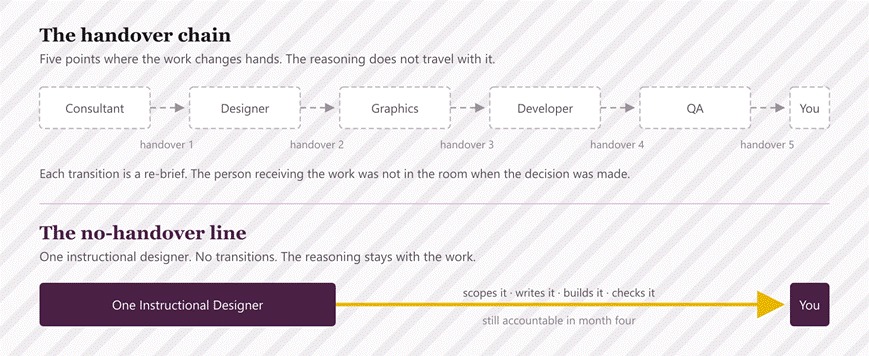
The handover chain versus the no-handover line. Reused verbatim from earlier posts. Alt text: Four-step handover chain from instructional designer to graphics to developer to QA to you, shown greyed and dashed, above a single unbroken gold line from instructional designer straight to you.

The greyed chain above shows the usual path, from designer to graphics to developer to QA, then to you. The gold line below shows the alternative, where the designer who interviewed the trainer also writes, builds and checks the course. The facilitator’s knowledge reaches the learner without being re-briefed four times.

For a Director of Programs, that means sitting the conversion designer in on a live session before the storyboard starts.

Which Courses to Convert First

Convert first the courses where online delivery saves the most and loses the least. A training manager can rank a catalogue with five tests and a spreadsheet, before any vendor is involved.

  1. Is the content stable for at least two years? Unstable content means paying to convert twice.
  2. Is it delivered repeatedly to many learners? Volume is where travel and trainer time savings come from.
  3. Is it mostly knowledge and process, rather than live interpersonal skill? Knowledge converts well.
  4. Can practice be built as scenarios with clear right and wrong answers? If yes, eLearning can replace the role-play.
  5. Is a subject-matter expert available to answer questions during the redesign? Without one, the build stalls.

Courses that pass all five go first. Courses that fail the third or fourth often suit a blended design or virtual instructor-led training instead.

A licensing school converting a pre-exam course usually passes all five. A leadership workshop built on live peer coaching usually fails two.

>> Tell Julian which courses are on your list and get a straight read on which to convert first

Questions to Ask Any Learning Partner Before a Conversion

Five questions show whether a partner will redesign your course or just repackage it. A handover-model firm usually fails at least three. An L&D Manager should send them in writing before scoping calls.

  1. Will the designer who analyses our classroom course also write and build the eLearning?
  2. How will you replace the facilitator’s explanations and corrections, module by module?
  3. Which parts of our course do you recommend not converting, and why?
  4. How will you test SCORM or xAPI tracking in our LMS before launch, and who fixes failures?
  5. Who owns the source files when the project ends?

LMS compatibility is the buyer-scorecard question the fourth one answers. A converted course that does not record completions properly creates a reporting problem worse than the classroom one it replaced.

VonGeyer Consulting is an Instructional Design House, meaning a firm where the designers who scope a course also write it, build it and check it. One named Senior Instructional Designer answers all five questions for the life of the project.

What Conversion Costs, and What Drives It

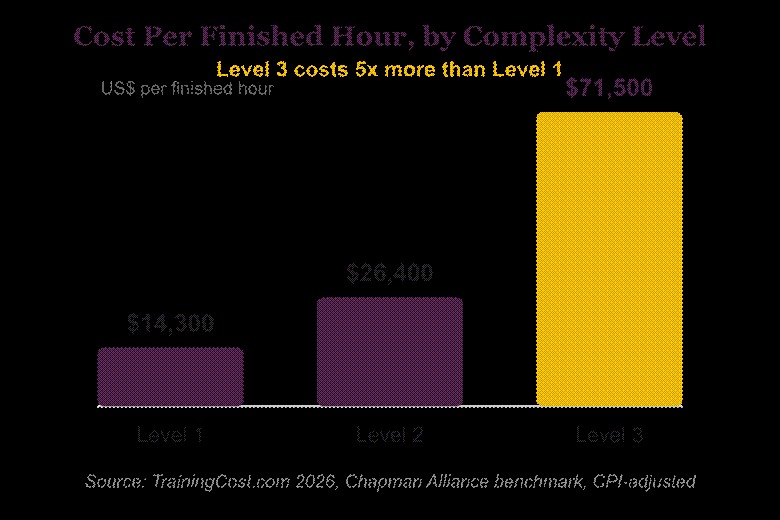
Conversion costs are driven by how much interactivity the redesign needs, not by how many slides the deck had. TrainingCost.com’s 2026 analysis, adjusting the Chapman Alliance study for inflation, gives three bands per finished hour.

Cost per finished hour of eLearning, inflation-adjusted Chapman bands: about $14,300 at Level 1, $26,400 at Level 2, $71,500 at Level 3. TrainingCost.com, 2026. Reused from post 4. Alt text: Bar chart of cost per finished hour rising steeply with complexity level.

The chart shows those three bands. A Level 1 course with basic interaction costs about $14,300 per finished hour. A Level 2 interactive course costs about $26,400, and a Level 3 simulation about $71,500.

Here is a worked illustration, with the assumption stated. Take a two-day workshop and assume the redesign keeps three hours of finished eLearning, moving the rest to job aids.

Redesign mix (assumed)Benchmark cost
3 hours at Level 1~$42,900
2 hours at Level 1, 1 hour at Level 2~$55,000
3 hours at Level 2~$79,200

These are industry benchmarks, not a quote. They show why the redesign decision, how much practice and at what level, moves the budget far more than the deck size does.

Source: [TrainingCost.com, eLearning Development Cost, 2026](https://trainingcost.com/elearning-development-cost)

When to Keep a Course in the Classroom

Keep a course in the classroom when the learning depends on live human interaction that a screen cannot replace. Negotiation practice, sensitive conversations and hands-on equipment training are the usual examples.

Virtual instructor-led training is often the better middle path. It keeps the facilitator and removes the travel, which suits a training manager whose problem is logistics rather than design.

A good partner will also tell you when the content itself is the problem. Converting an out-of-date workshop only produces an out-of-date eLearning course.

Where this doesn’t apply

VonGeyer does not deliver live facilitation or run virtual classrooms, so a straight move to virtual instructor-led training is better handled by your trainers. Native mobile apps are outside scope, translation is priced separately, and VonGeyer is not the right fit for a 10,000-seat conversion needed this month.

For courses that do convert, the strongest evidence a partner can offer is a large conversion delivered by the same people. VonGeyer rebuilt a 90-hour US real estate licensure course audio-first in five months, because learners studied in their cars. It was delivered in monthly work packages into the client’s own LCMS.

What Changes When Conversion Is Treated as Redesign

ILT to eLearning conversion pays off when it is treated as a redesign with one accountable owner. For an L&D Manager, that means a catalogue that reaches more learners without losing what the trainers taught. It also avoids a second job managing the vendor.

>> Talk to Julian about converting your first three courses, and which to leave in the classroom

FAQ

How do you convert instructor-led training to eLearning?

Start by observing the live course and interviewing the trainer, then decide what to keep, cut or move to job aids. Redesign each facilitator task as content, practice or feedback, build it in an authoring tool, and test tracking in the LMS before launch.

How long does it take to convert ILT to eLearning?

It depends on the finished length and how interactive the course must be. Simple knowledge courses can convert in weeks, while scenario-heavy courses take months. Content that is still changing adds the most time, so settle it before the build starts.

How much does it cost to convert ILT to eLearning?

Cost follows the complexity of the finished course, not the number of slides. Industry benchmarks put one finished hour at about $14,300 for basic interaction, about $26,400 for interactive courses and about $71,500 for simulations, adjusted for inflation.

What is the difference between ILT and VILT?

ILT is instructor-led training delivered in a physical classroom. VILT is instructor-led training delivered live online through a virtual classroom. Both keep a live facilitator, whereas eLearning is self-paced and replaces the facilitator with designed content and feedback.

Can all classroom training be converted to eLearning?

No. Knowledge and process content converts well, and so does practice that can be built as scenarios. Skills that depend on live human interaction or physical equipment usually need a classroom, virtual session or blended design instead.

AI in Instructional Design: What It Changes for Your Courses

AI in instructional design now speeds up outlining, first drafts, question writing and narration, while the design decisions still need a human. The courses that improve are the ones where AI saves production time and an accountable designer checks every line it touches.

For an L&D Manager buying custom courses, the useful question is not whether a vendor uses AI. It is where the AI sits and who reviews its output.

Almost everyone uses it now. ATD Research’s July 2025 study of 232 instructional designers found 80% use AI tools while designing courses.

That makes AI use a baseline, not a differentiator. What separates vendors is what they tell you about it.

AI in instructional design (definition)
AI in instructional design means using generative AI tools to support course creation: outlining, drafting, writing assessment items, producing narration and summarising source material. In a corporate L&D buying context, the design choices, the accuracy check and the accountability for the finished course remain with a named human designer.

TL;DR

  1. AI in instructional design speeds up drafting, question writing and narration; humans still make the design decisions.
  2. It matters to L&D Managers and procurement leads buying custom courses in 2026.
  3. 80% of instructional designers now use AI, so using it is no longer a selling point.
  4. The real risk is unreviewed output and client content entering a language model.
  5. AI cuts production cost; it does not cut the cost of instructional judgment.
  6. Ask any vendor five questions about AI before you sign.
  7. The No-Handover Check adds one line every buyer should demand: what AI did.

>> See how AI voice was used at 90-hour scale with a human check on every take

Table of Contents

1. How Instructional Designers Actually Use AI Now

2. Where AI Saves Time, and Where It Doesn’t

3. Why AI Doesn’t Lower the Cost of Good Courses

4. What Your Vendor Should Tell You About AI

5. The No-Handover Check, With an AI Line

6. When an AI Course Tool Is Enough on Its Own

7. FAQ

How Instructional Designers Actually Use AI Now

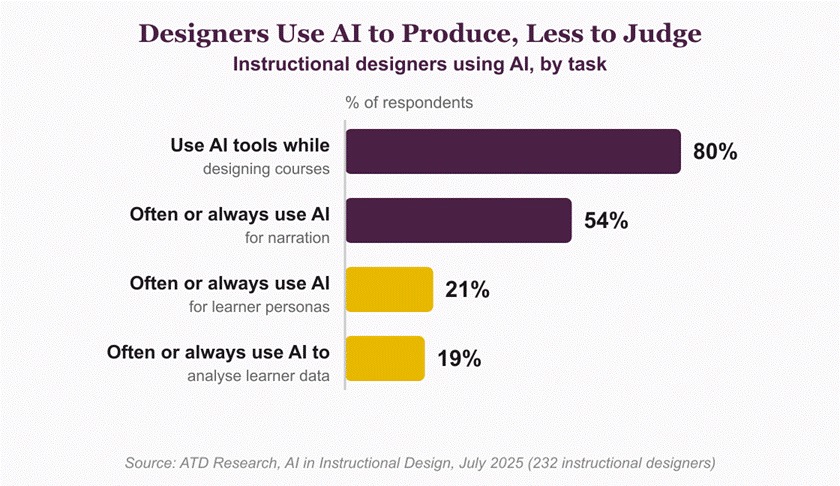
Instructional designers mostly use AI for drafting and production support, not for analysing learners. ATD’s study found AI most common for outlining, storyboarding, writing learning objectives and narration.

Use falls away for the work closest to judgment. Only 21% always or often use AI to develop learner personas, and only 19% use it to analyse learner data.

How instructional designers use AI, by task: 80% use AI while designing courses, 54% often or always for narration, 21% for learner personas, 19% to analyse learner data. ATD Research, July 2025, 232 instructional designers. Alt text: Horizontal bar chart with the two judgment tasks highlighted in gold.

The chart compares four findings from ATD’s 2025 survey of 232 instructional designers. 80% use AI tools while designing courses, and 54% often or always use AI for narration.

Only 21% often or always use it for learner personas, and 19% for analysing learner data.

Source: [ATD Research, AI in Instructional Design, July 2025](https://www.td.org/content/atd-blog/instructional-design-in-the-age-of-ai)

For an L&D Manager, that pattern is reassuring and a warning at once. Designers use AI where it is safe to check. The risk sits with vendors who extend it into decisions without saying so.

Where AI Saves Time, and Where It Doesn’t

AI saves time on first drafts and repetitive production. It saves little on the work that decides whether a course changes behaviour: analysis, scenario design and review.

Buyers expect the savings. TalentLMS’s 2026 L&D report found 88% of HR managers expect generative AI to change the time needed to create learning content. The table shows where that expectation holds.

TaskWhat AI does wellWhat still needs the designer
Research and source summariesFast first pass over long documentsChecking accuracy against the source
Outlines and objectivesDrafts structure in minutesChoosing what the learner must do differently
Assessment itemsGenerates question banksMaking wrong answers realistic, not obvious
NarrationProduces voice at scaleListening to every take for errors
ScenariosSuggests situationsBuilding the decision and its consequences
ReviewFlags typos and inconsistenciesJudging whether the course works

A Director of Programs at a licensing school should read that right-hand column as the price of quality. If a quote shrinks the right-hand work, the course will shrink with it.

Why AI Doesn’t Lower the Cost of Good Courses

The assumption is that AI turns course design into a low-cost commodity. The reality is that AI cuts production cost, and judgment becomes the scarce part.

When drafts cost almost nothing, the bottleneck moves to review. Someone still has to decide what the course must achieve, check every AI-written line and approve it. In a handover-model firm, that check is spread across people who each see one piece.

The handover chain versus the no-handover line. Reused verbatim from earlier posts. Alt text: Four-step handover chain from instructional designer to graphics to developer to QA to you, shown greyed and dashed, above a single unbroken gold line from instructional designer straight to you.

The greyed chain above shows the usual path, from designer to graphics to developer to QA, then to you. The gold line below it shows the alternative, where the designer who scoped the course also builds and checks it. With AI in the workflow, that single owner is also the person who reviews what the AI produced.

For an L&D Manager comparing quotes, a much lower AI-led bid usually means less review, not better tooling. Ask which right-hand tasks from the table above it removed.

What Your Vendor Should Tell You About AI

A vendor should be able to state, in writing, where AI is used, what client data it touches and who reviews its output. If the answer is vague, the AI policy does not exist.

Data and AI handling is the buyer-scorecard question this section answers. Procurement and an L&D Manager should put these five questions to every shortlisted partner.

  1. Which tasks in our project will use AI, and which will not?
  2. Will any of our content, documents or recordings be entered into a language model?
  3. Who reviews every AI-generated line, image and voice take before we see it?
  4. If AI voice is used, how is each take checked, and who owns the audio files?
  5. Do we own the source files, including anything AI helped produce?

VonGeyer’s answer to the second question is no. We use AI for research, gap-filling, question banks, voice and first-pass translation. We do not use it to write whole scripts, and we do not put client content into a language model.

>> Ask Julian how AI would and would not be used on your project

The No-Handover Check, With an AI Line

The No-Handover Check is five lines any buyer can ask a vendor to fill in for a past project. A handover-model firm answering honestly writes four or five different names. The fourth line, what AI did, is the one most vendors now struggle to answer plainly.

The No-Handover Check

  • Who designed it: a named Senior Instructional Designer
  • Who built it: the same designer, in the authoring tool
  • Who checked it: the same designer, against standards owned by the Head of Design Strategy
  • What AI did: research, question banks and voice, with every output reviewed by the designer
  • Who owned the engagement: the same named Senior Instructional Designer, first call to final upload

Here is how that worked at scale. On a 90-hour US real estate licensure course, VonGeyer used AI voice production with a human check on every take, and no AI script generation.

VonGeyer is an Instructional Design House, meaning a firm where the designers who scope the work also write it, build it and check it. That is why the AI line has a single owner.

When an AI Course Tool Is Enough on Its Own

An AI course generator is enough when the content is simple, internal and low-risk, and nobody’s performance depends on it. A short explainer of a new expense tool, read once and rarely revisited, fits that description.

It is not enough when the course must change a decision, carries regulatory weight or is the product you sell. A Director of Programs whose learners sit a licensing exam needs designed practice, not generated pages.

An honest partner will tell you which of your courses fall into which group. Many catalogues hold both.

Where this doesn’t apply

VonGeyer does not sell or resell AI course-generation software, and it is not the lowest-cost route to a simple internal explainer. Native mobile apps and live facilitation are outside scope, and translation beyond first-pass AI drafts is priced separately.

If most of your backlog is simple internal content, an AI tool and a reviewer inside your team may be the right answer. Use a design partner for the courses that carry risk.

What Changes When AI Has One Accountable Owner

AI in instructional design is now normal. What changes your results is whether one accountable designer owns both the design and the review of everything AI produced. For a stretched L&D team, that means faster courses without a second job checking the vendor’s machine output.

>> Talk to Julian about where AI would save time on your next course, and where it wouldn’t

FAQ

What is the role of AI in instructional design?

AI supports instructional designers with research, outlining, first drafts, question writing and narration. It speeds up production. The designer still decides what the learner must do differently, checks accuracy and stays accountable for the finished course.

Can AI create an eLearning course on its own?

AI tools can generate a basic course from a document, and that can be enough for simple, low-risk internal content. Courses that must change behaviour, meet regulatory standards or prepare people for exams still need a designer to build the practice and check every line.

What are the best AI tools for instructional designers?

Designers commonly use general language models for drafting and outlining, and AI voice tools for narration. Authoring tools such as Articulate 360 now include AI features too. The best tool depends on the task, and every output still needs human review.

Is AI-generated training content accurate?

Not reliably. AI can produce confident errors, outdated facts and plausible but wrong answer options. Every AI-generated line, image and voice take needs a review by someone who knows the subject and the learning goal.

Should you put company content into AI tools when building training?

Only under a clear policy that your legal and security teams have approved. Many design partners, including VonGeyer, choose not to enter client content into language models at all. They use AI only for tasks that do not need it.

eLearning Staff Augmentation vs a Managed Design Team

eLearning staff augmentation places a contract designer inside your team, and you direct their work day to day. A managed design team is run by the partner, with a named designer accountable for what you agreed. Your team manages outcomes instead of tasks.

For a Head of Learning with a frozen requisition and a growing backlog, the choice depends on who has time to manage extra capacity.

That time is getting scarcer. In ATD’s 2026 State of the Industry report, only 28% of talent development leaders expected financial resources to rise, down from 48% a year earlier.

Budgets are tighter, and the work is not shrinking. So the cost that matters is not only the bill rate. It is the management time each model consumes.

Short answer

Choose staff augmentation when you have a strong internal lead who can brief, review and direct a contractor every week. Choose a managed design team when that lead is the bottleneck and you need finished courses, not extra hands. Teams usually switch when contractor turnover or review load starts costing more than the work itself.

TL;DR

  1. eLearning staff augmentation adds a contractor you manage; a managed design team adds an owner who delivers.
  2. It is a decision for Heads of Learning and Directors of Programs facing a backlog with no headcount.
  3. The hidden cost of augmentation is your own management time, which no rate card shows.
  4. A year-one in-house hire runs about $129,000 fully loaded and buys one person.
  5. If project work fills only six of twelve months, that hire costs about $21,600 per productive month.
  6. Augmentation fails when no one inside has time to direct it.
  7. Managed teams fail when the scope keeps changing and nobody owns the brief.

>> See how a managed engagement ran on a 90-hour licensure course, from first call to final upload

Table of Contents

1. What Each Model Actually Buys You

2. Why More Hands Rarely Means More Capacity

3. How to Choose in Four Questions

4. The Cost of a Hire, Calculated

5. What a Managed Design Team Looks Like in Practice

6. When Staff Augmentation Is the Better Choice

7. FAQ

What Each Model Actually Buys You

Staff augmentation buys time from a person. A managed design team buys a finished result from a named owner. A permanent hire buys a person and the long-term capacity they build.

The difference shows up in who writes the brief, who reviews the storyboard and who answers when a module slips. With augmentation, all three stay with you. With a managed team, the partner’s named designer holds them, and you approve.

A Director of Programs at a certification body feels this sharply. Their learning is the product, so a contractor who leaves mid-catalogue takes context that nobody else holds. The table sets the three models side by side on the points a buyer can check.

Point to checkStaff augmentationManaged design teamPermanent hire
Who directs daily workYouThe partner’s named designerYou
Who owns delivery datesYouThe partnerYou
Who writes the briefYou, then the contractorThe designer who builds itThe hire
What you pay forHoursAgreed outcomes, monthlySalary, benefits, recruiting
Time to startDays to weeksWeeks6 to 12 weeks, often more
What happens when work stopsContract endsRetainer endsSalary continues
Main riskYour review load growsScope drift without an ownerPaying for idle months

Why More Hands Rarely Means More Capacity

The assumption is that adding a designer adds capacity. The reality is that it adds capacity only if someone has time to direct them.

A contractor arrives without your context. Someone must brief them, review every storyboard and correct the first drafts. For an L&D Manager already running five projects, that someone is the same person who was overloaded before.

Augmentation also spreads the work across more hands. The contractor drafts, an internal reviewer edits, a developer builds and a coordinator chases sign-off. Each handover is a re-brief, and each re-brief is where intent gets lost.

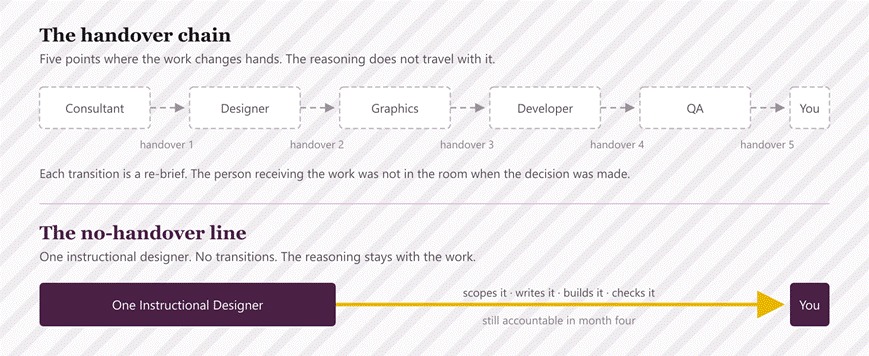
The handover chain versus the no-handover line. Reused verbatim from earlier posts. Alt text: Four-step handover chain from instructional designer to graphics to developer to QA to you, shown greyed and dashed, above a single unbroken gold line from instructional designer straight to you.

The greyed chain above shows the usual path: designer to graphics to developer to QA, then finally to you. The gold line below it shows the alternative, where the designer who scoped the work also builds and checks it. Fewer handovers means fewer re-briefs for your team to absorb.

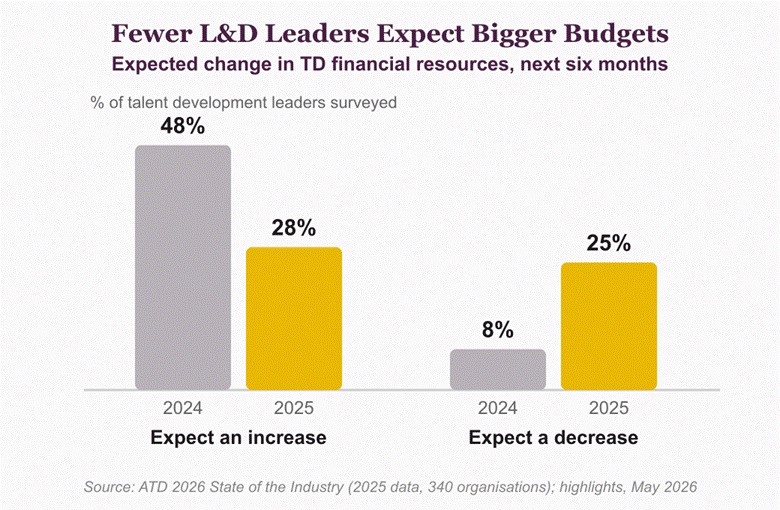
Talent development leaders expecting financial resources to rise or fall in the next six months: 48% increase and 8% decrease in 2024; 28% increase and 25% decrease in 2025. ATD 2026 State of the Industry. Alt text: Grouped bar chart, grey 2024 bars beside gold 2025 bars, showing fewer leaders expect increases and more expect decreases.

The chart compares two years of ATD survey data on budget expectations. In 2024, 48% of talent development leaders expected resources to increase and 8% expected a decrease. In 2025, those figures were 28% and 25%.

A leader planning capacity today should assume flat or falling budgets.

Source: [ATD, Highlights From ATD’s 2026 State of the Industry Report](https://www.td.org/content/atd-blog/highlights-from-atd-s-2026-state-of-the-industry-report)

How to Choose in Four Questions

Four questions decide the model, and a Head of Learning can answer all four in one meeting. Answer them with the person who would manage the extra capacity in the room, not only with procurement.

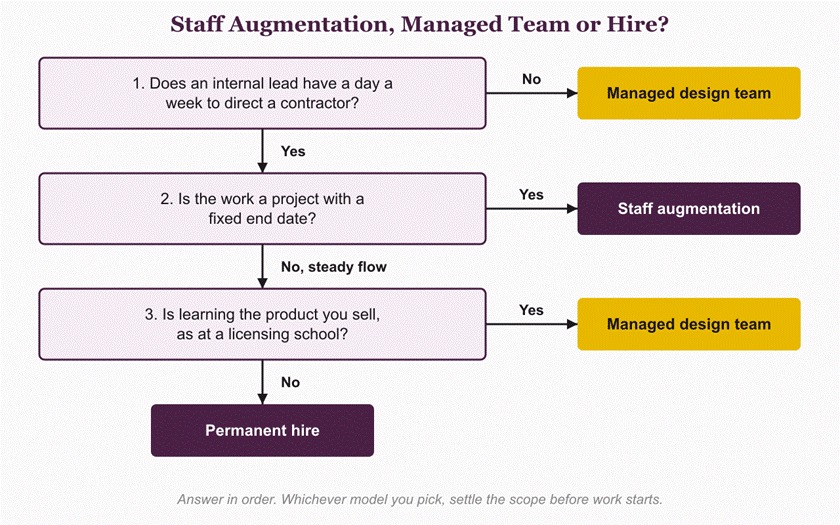
  1. Do you have an internal lead with at least a day a week to direct a contractor? If not, augmentation will stall.
  2. Is the scope stable for the next three months? If not, a managed team needs a tighter brief first.
  3. Is the work a project with an end date, or a steady flow? A steady flow favours a retainer or a hire.
  4. Does the learning sit at the heart of your product, as it does for a licensing school? If yes, continuity matters more than rate.

Decision tree: staff augmentation, a managed design team or a permanent hire. Alt text: Three yes-or-no questions in order leading to managed design team, staff augmentation, managed design team or permanent hire.

The decision tree puts three of those questions in order. No internal lead with time points to a managed team, and a lead with a fixed-end project points to staff augmentation.

For a steady flow of work, learning that is your product points to a managed team. Anything else points to a permanent hire.

Scalability is the buyer-scorecard question this section answers. The model that scales is the one whose management load does not grow with every designer you add.

The Cost of a Hire, Calculated

A permanent instructional designer costs about $129,000 in year one, before they finish a single course. Glassdoor’s 2026 US data puts average salary at $92,450.

Add benefits and payroll taxes at an assumed 25% and recruiting at 15%, the low end of the common range. That is $92,450 × 1.40, or about $129,400.

Now the calculation most budgets miss. If project work keeps that designer fully busy for only six months of the year, each productive month costs about $21,600. At twelve busy months, it costs about $10,800.

Months of real project workYear-one costCost per productive month
12~$129,400~$10,800
9~$129,400~$14,400
6~$129,400~$21,600

Robert Half’s 2026 data puts the midpoint salary at $96,500, so the real figure may be higher. For a Director of Programs whose course work comes in waves, the idle months are the real cost of a hire.

About $21,600 per productive month

That is what a year-one hire costs if real project work fills only six months. It is the number to compare against any augmentation rate or managed retainer.

Source: [Glassdoor, Instructional Designer Salary, US 2026](https://www.glassdoor.com/Salaries/instructional-designer-salary-SRCH_KO0,22.htm), with stated assumptions

What a Managed Design Team Looks Like in Practice

A managed team works when one named designer owns your work from the first call to the final upload. That designer scopes it, writes it, builds it and checks it, so nothing is lost between stages.

VonGeyer Consulting runs this way. It is an Instructional Design House, meaning a firm where the instructional designers who scope the work also write it, build it and check it. Quality is checked against design standards owned personally by Reena Roy, Head of Design Strategy.

The clearest example is scale. For a US real estate school, VonGeyer rebuilt a 90-hour licensure course audio-first in five months. It was delivered in monthly work packages with throughput reporting, straight into the client’s own LCMS.

A Director of Programs judging any managed offer should ask for the same three things. A named owner, a monthly delivery report, and a minimum term short enough to test the fit.

>> Meet the people who would own your work before you commit to a retainer

When Staff Augmentation Is the Better Choice

Staff augmentation is the better choice when you already have the leadership and only lack hands. A Head of Learning with a strong senior designer and a short, well-defined project should simply add a contractor.

It also wins when the work must sit inside your systems all day. Examples include daily stand-ups, internal tools only your staff can access, or security rules that bar outside teams.

A managed team is the wrong choice when the brief changes weekly and no one inside owns it. No partner can deliver to a moving target, however good the designers are.

Where this doesn’t apply

VonGeyer does not place contractors inside client teams, and it is not a staffing marketplace. It is also not the right fit for a 10,000-seat rollout that needs five specialists in parallel this month. Live facilitation and native mobile apps are outside scope, and translation is priced separately.

If your need is two extra pairs of hands for eight weeks under your own lead, a staffing firm is the honest answer. If your need is someone to own the outcome, read on to the FAQ.

What Changes When Capacity Stops Creating Work

The choice is not about the hourly rate. It is between help you manage and help that manages itself. For a stretched L&D team, the right model adds finished courses without adding a second job for the person who was already overloaded.

>> Talk to Julian about which model fits your backlog and your team

FAQ

What do you mean by staff augmentation?

Staff augmentation means adding external people to your team for a set period while you direct their work. In eLearning, it usually means a contract instructional designer or developer who works to your briefs, in your tools, under your management.

Is staff augmentation considered outsourcing?

It is a form of outsourcing, but a narrow one. You outsource the hiring and employment of the person, not the responsibility for the result. With a managed team or a project partner, responsibility for delivery moves to the partner too.

What are the advantages and disadvantages of staff augmentation?

The advantages are speed to start, flexible length and full control over the work. The disadvantages are the management time it takes, the context lost when a contractor leaves and the review load that stays with your team.

What are the key differences between consulting and staff augmentation?

A consultant advises on what to do and usually hands the plan back. Staff augmentation adds people who do the work under your direction. A managed design team does the work and owns the result, which is a third model between the two.

What are the best practices for staff augmentation?

Name one internal lead who has time to direct the contractor every week. Write a clear brief and a fixed review process before day one. Keep source files in your own systems so nothing leaves with the contractor.

Why Compliance Training Fails, and How to Fix It

Compliance training fails when it is built to be completed rather than to change a decision employees make at work. A course that recites policy passes the LMS completion check and leaves the risky behaviour exactly where it was.

For a Head of Learning at a bank or a law firm, that gap is now a regulatory question, not only a design one.

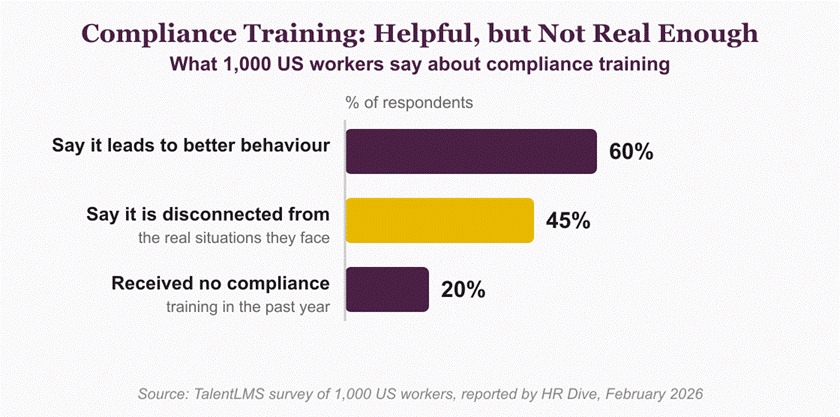
Employees notice it first. A TalentLMS survey of 1,000 US workers was reported by HR Dive in February 2026. 45% said their compliance training is disconnected from the real situations they face.

The fix is not a brighter course. It is a course designed around the few decisions where people actually go wrong.

Why compliance training fails (definition)
Compliance training fails when it measures completion instead of behaviour. Courses that restate policy, without practising the specific decisions where misconduct happens, produce high completion rates and unchanged conduct. Effective compliance training is built around those decisions and measured by what people do afterwards.

TL;DR

  1. Compliance training fails because it is designed for completion, not for the decisions where misconduct happens.
  2. It matters most to Heads of Learning and compliance training leads in banks, lenders and law firms.
  3. 45% of US workers say their compliance training is disconnected from real situations.
  4. The US Justice Department now asks whether training has an impact on employee behaviour.
  5. Making a course more entertaining rarely helps; practising the risky decision does.
  6. A redesign starts with three to five decisions, not with the policy document.
  7. What a design partner does not include matters as much as what it does.

>> See how one engagement was scoped, built and delivered by the same team

Table of Contents

  1. Why High Completion Rates Hide the Problem
  2. Why Making It More Engaging Rarely Works
  3. What Regulators Now Ask About Your Training
  4. How to Redesign a Compliance Course Around Decisions
  5. What This Doesn’t Include
  6. Custom or Off-the-Shelf Compliance Courses: Where Each Fits
  7. FAQ

Why High Completion Rates Hide the Problem

High completion rates hide the problem because completion measures attendance, not judgment. A 98% completion figure tells a compliance committee that people clicked through. It says nothing about whether a relationship manager would spot a suspicious transaction next week.

The same survey shows the split. Most workers believe the training helps, yet nearly half say it does not match their real situations. One in five said they received no compliance training at all in the last year.

What 1,000 US workers say about compliance training: 60% say it leads to better behaviour, 45% say it is disconnected from real situations, 20% received none in the past year. TalentLMS survey reported by HR Dive, February 2026. Alt text: Horizontal bar chart with the 45% disconnected bar highlighted in gold.

The chart shows three findings from the TalentLMS survey of 1,000 US workers. 60% say compliance training leads to better behaviour at work.

45% say it is disconnected from the real situations they face. 20% received no compliance training in the past year.

Source: [HR Dive, reporting TalentLMS survey data, February 2026](https://hrdive.com/news/employees-say-compliance-training-disconnected-from-real-life/811026)

For a compliance training lead at a lender, the 45% is the number to act on. It points to the specific design failure: generic content that never reaches the employee’s actual decisions.

Why Making It More Engaging Rarely Works

The assumption is that compliance training fails because it is boring. The reality is that it fails because it trains the wrong thing.

The usual response is a format upgrade: animation, gamification, a shorter video. Those can help attention. But if the course still restates the policy, people finish a livelier version of the same irrelevance.

The deeper cause is how these courses get made. Legal writes the policy summary, a vendor’s designer storyboards it, a developer builds it and a reviewer checks the wording. No one in that chain owns the question of what the learner must decide differently.

The handover chain versus the no-handover line. Reused verbatim from earlier posts. Alt text: Four-step handover chain from instructional designer to graphics to developer to QA to you, shown greyed and dashed, above a single unbroken gold line from instructional designer straight to you.

The greyed chain above shows the usual path, from designer to graphics to developer to QA, then to you. The gold line below shows the alternative, where the designer who scoped the decisions also builds and checks them. Intent survives because nobody has to re-brief it.

A Head of Learning at a law firm sees the result in the review cycle. The course is accurate, signed off and published, and it changes nothing about how associates handle a conflict check.

What Regulators Now Ask About Your Training

Regulators now ask whether training changed behaviour, not only whether it was delivered. The US Justice Department’s guidance on evaluating corporate compliance programmes, updated in September 2024, puts the question directly.

“Has the company evaluated the extent to which the training has an impact on employee behavior or operations?”

Source: [US Department of Justice, Criminal Division, Evaluation of Corporate Compliance Programs (Updated September 2024)](https://www.justice.gov/criminal/criminal-fraud/compliance)

The same guidance asks whether training is tailored to high-risk employees and whether it covers lessons from past incidents. That is a design brief, not a completion target.

Most functions are not ready to answer it. ATD’s 2026 State of the Industry report found that less than a quarter of organisations measure whether their training achieved its organisational goals.

What most teams reportWhat a regulator now asksWhat to measure instead
Completion rateHas training changed behaviour?Error or breach rates in the trained decision
Quiz pass rateHave employees learned the subject matter?Scenario performance on realistic cases
Hours deliveredIs training tailored to high-risk roles?Coverage of each high-risk role
Annual refresh doneDoes training cover past incidents?Incidents reflected in the next version

How to Redesign a Compliance Course Around Decisions

A compliance redesign starts with the three to five decisions where misconduct actually happens, then builds practice around each one. The policy document becomes reference material, not the course.

A compliance training lead at a bank can run the first four steps with their risk team before any vendor is involved.

  1. List the decisions where breaches occurred or nearly occurred in the last two years.
  2. Map each decision to the roles that make it, so high-risk roles get their own path.
  3. Write one realistic scenario per decision, with the wrong answer as tempting as it is in real life.
  4. Agree one behaviour signal per decision, such as escalations raised or exceptions logged.
  5. Build the scenarios, publish to the LMS as SCORM or xAPI, and test tracking before launch.
  6. After every incident, add it to the next version of the course.

Measurable outcomes is the buyer-scorecard question this section answers. A course designed this way can report on behaviour signals, not just completions.

VonGeyer Consulting is a registered supplier to Bajaj Finance and Kennedys Law, both in sectors where compliance training carries regulatory weight.

>> Tell Julian which decisions your course needs to change, and get a straight answer on scope

What This Doesn’t Include

A compliance redesign from VonGeyer covers the learning design and the build. It deliberately leaves out several things buyers sometimes assume are bundled.

  • Legal advice or interpretation of the regulation. Your legal or compliance team owns that.
  • Writing or rewriting the policy itself. We design training around a policy you have approved.
  • An off-the-shelf course library or annual licences. We build courses you own.
  • LMS hosting or administration. We deliver into your LMS and test that tracking works.
  • Translation, which is priced separately when needed.

Stating this up front protects the compliance lead. Gaps found mid-project cost more than gaps agreed at the start.

Where this doesn’t apply

If your need is a broad library covering twenty standard topics for every employee, a licensed off-the-shelf catalogue will usually serve you better. Custom design pays off for the few high-risk decisions where generic content fails. VonGeyer is not a 10,000-seat rollout vendor for this month.

Custom or Off-the-Shelf Compliance Courses: Where Each Fits

Off-the-shelf courses fit broad, stable topics that every employee needs. Custom compliance training fits the high-risk decisions that are specific to your products, clients or jurisdiction.

Most organisations need both. A Head of Learning at a lender might license general data-protection training and commission custom scenarios for loan exception handling.

Point to checkOff-the-shelf courseCustom compliance course
Best forBroad, standard topics for all staffHigh-risk, role-specific decisions
ScenariosGeneric workplace examplesYour products, cases and past incidents
Speed to launchDaysWeeks to months
OwnershipLicensed, renewed each yearYou own the course and source files
Behaviour measurementCompletion and quiz scoresScenario performance and agreed signals
Updates after an incidentVendor’s scheduleYours, built into the next version

The useful question is not custom or off-the-shelf. It is which decisions are worth designing for, and which can be covered by a library.

What Changes When Training Targets the Decision

Compliance training that targets the decision gives a Head of Learning something completion rates never could: evidence that conduct changed. For a stretched L&D team, it also means fewer courses to maintain, because each one does a specific job.

>> Talk to Julian about redesigning the compliance course your regulator is most likely to ask about

FAQ

Why is compliance training important?

Compliance training helps employees recognise and avoid conduct that creates legal, financial or reputational risk. It also gives an organisation evidence that it tried to prevent misconduct, which regulators and prosecutors consider when assessing a compliance programme.

What happens if an employee is not properly trained?

An untrained employee is more likely to make the decisions that lead to breaches, fines or client harm. For the organisation, weak training can also count against it when regulators assess whether its compliance programme was effective.

Why is lack of training a problem?

Without training, employees fall back on habit or guesswork in situations where the rules are specific. The problem grows in regulated roles, where one wrong decision can trigger an investigation, a penalty or a lost client.

What are the 7 pillars of compliance?

The seven elements usually cited come from the US Federal Sentencing Guidelines. They are written standards, oversight, due diligence in delegating authority, training and communication, monitoring and auditing, consistent enforcement, and response to violations. Training is one pillar, and it supports all the others.

How do you measure whether compliance training works?

Agree one behaviour signal for each decision the course targets, such as escalations raised or exceptions logged. Compare that signal before and after the course, alongside scenario performance. Completion rates alone show attendance, not effectiveness.

Rapid eLearning Development: What It Is, When to Use It, and When Not To

Rapid eLearning development builds a course in weeks by combining template-driven authoring tools, existing content and a capped review process. It works when the content is stable and information-led, and it fails when the learning depends on custom simulation or unresolved subject-matter debate.

For an L&D Manager with a Q1 deadline and two open requisitions, the question is which of those two situations you are in.

TalentLMS’s 2026 L&D report surveyed US employees and HR managers in September 2025. It found 53% of employees and half of HR managers say high workloads leave little room for training.

Speed is not a luxury for that team. It is the only way the course gets used.

Rapid eLearning development (definition)
Rapid eLearning development is a way of building courses in weeks. It uses template-driven authoring tools such as Articulate Rise 360, existing source content, one accountable subject-matter expert and a fixed number of review rounds. It suits stable, information-led content, and it is a different scope from custom eLearning, not a weaker version of it.

TL;DR

  1. Rapid eLearning development builds courses in weeks from existing content, template-driven tools and capped review.
  2. It suits L&D Managers and catalogue owners with stable, information-led content and a hard deadline.
  3. Authoring tools shorten build hours, but handovers and review waits are what stretch the calendar.
  4. At Level 1 complexity, 20 hours of finished learning is about 1,580 production hours, roughly nine months of one designer’s year.
  5. The fastest rapid projects fix scope, name one approving expert and cap review rounds before the build starts.
  6. Rapid is the wrong call for safety-critical training, custom simulations and content still being argued over.
  7. Five questions put to any partner before you sign show whether their speed is real.

>> See what a full engagement actually looked like, from first call to final upload

Table of Contents

1. What Rapid eLearning Development Actually Means

2. Where the Time Really Goes

3. When Rapid Development Is Worth It

4. What Rapid Development Costs

5. Questions to Ask Any Learning Partner Before a Rapid Build

6. Where Rapid Is the Wrong Call

7. What Good Looks Like

8. FAQ

What Rapid eLearning Development Actually Means

Rapid eLearning development builds a course in weeks. It starts from existing content, uses template-driven tools such as Articulate Rise 360, and limits review to a fixed number of rounds. The speed comes from scope discipline, not from skipping instructional design.

The authoring tool is only one part of that. An L&D Manager who buys new Storyline seats and changes nothing else gets the same calendar in a faster wrapper.

Rapid is also not a synonym for low-effort. A rapid build still needs a storyboard, an SME sign-off and an LMS test in SCORM or xAPI before launch.

Older linear models such as ADDIE finish each phase before the next starts. Rapid projects run iterative cycles, closer to the Successive Approximation Model (SAM). The table sets rapid beside custom eLearning on the points a buyer can check.

CriterionRapid eLearning developmentCustom eLearning development
Best forCompliance updates, onboarding, product knowledgeSimulations, branching scenarios, high-stakes skills
Starting pointExisting slides, documents, recordingsA blank brief and a full needs analysis
InteractivityTemplate blocks, knowledge checksCustom logic, scenarios, bespoke media
ReviewOne approving SME, capped roundsMultiple stakeholders, staged sign-offs
Main riskScope creep turns it into a slow custom buildCost and calendar time
Typical toolsRise 360, template-based Storyline 360Storyline 360 with variables and JavaScript, custom media

Where the Time Really Goes

The assumption is that rapid means a faster authoring tool. The reality is that tools shorten build hours, while handovers and review waits stretch the calendar.

A conventional project passes through a scoping consultant, a storyboarding designer, a graphics team, a developer and a QA reviewer. Each handover is a re-brief, and each re-brief waits in someone’s queue. A Director of Programs refreshing forty courses feels those queues as months, not hours.

The Chapman Alliance’s 2010 study of 249 completed surveys puts a Level 1 finished hour at about 79 development hours. TrainingCost.com republished the figures and re-verified the Level 1 and Level 3 ones in June 2026. That is about two working weeks of one designer’s time.

Treat that as an illustration, not a measured average. If a one-hour course still takes a quarter to ship, most of those weeks were queue time.

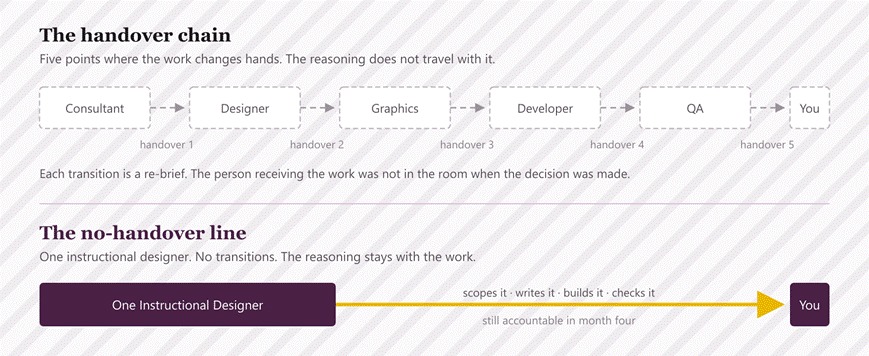
The handover chain versus the no-handover line. Reused verbatim from earlier posts. Alt text: Four-step handover chain from instructional designer to graphics to developer to QA to you, shown greyed and dashed, above a single unbroken gold line from instructional designer straight to you.

The greyed chain above is the conventional path, from instructional designer to graphics to developer to QA and finally to you. The gold line below it is the alternative. The designer who scoped the work builds and checks it.

TalentLMS also found 88% of HR managers expect generative AI to affect the time needed to create learning content. AI can draft faster, but it cannot shorten a review queue.

When Rapid Development Is Worth It

Rapid development is worth it when the content is stable, one expert can approve it, and the learner needs information more than practice. It is the wrong choice when any of those three fails.

A compliance manager refreshing annual policy training is the classic fit. A team building a negotiation simulation is not. Four tests decide the call before any tool is chosen, and you should answer them in writing with your SME, not in a kickoff meeting.

  1. Is the source content stable, with no open policy questions? If not, wait.
  2. Can one named SME approve every review round? If not, rapid will slow down.
  3. Does the learner mostly need to know, not practise? If not, choose custom.
  4. Can the review rounds be capped in writing? If not, scope will creep.

Each test protects one thing rapid depends on: settled content, a single approver and a fixed number of review rounds. A Director of Programs with forty stable compliance modules passes all four. A team still debating policy wording fails the first, and the calendar drifts back toward custom-build length.

What Rapid Development Costs

Rapid development usually costs less than custom because it sits at the lower complexity levels, where fewer production hours go into each finished hour. TrainingCost.com adjusts the 2010 Chapman figures for inflation, about 42% using the BLS CPI-U. That puts a Level 1 page-turner at about $14,300 per finished hour and a Level 2 interactive course at about $26,400.

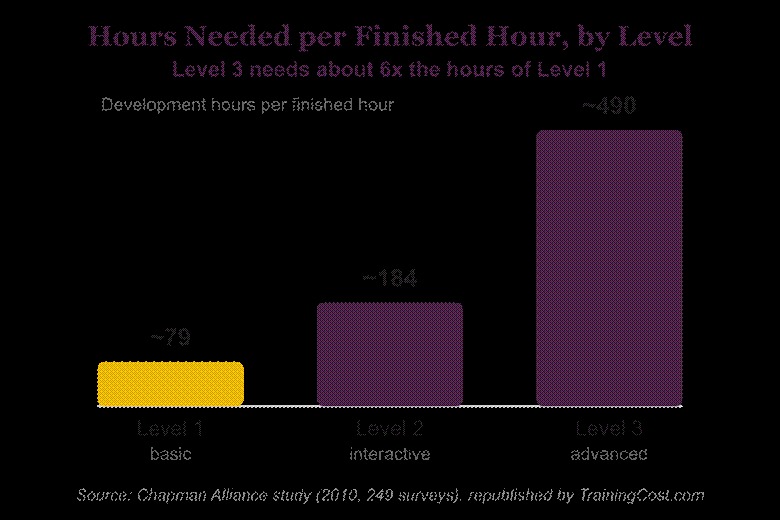
Development hours needed per finished hour of eLearning: about 79 at Level 1, 184 at Level 2, 490 at Level 3. Chapman Alliance study (2010, 249 surveys), republished by TrainingCost.com. Alt text: Bar chart of development hours per finished hour at three complexity levels, Level 3 about six times Level 1.

The chart shows development hours per finished hour at three levels: about 79, 184 and 490. A Level 3 simulation needs roughly six times the hours of a Level 1 build. Rapid development sits at the left of the chart, and the ceiling sits at the right.

Here is a calculation worth doing before any quote arrives. At the Level 1 ratio, a 20-hour catalogue needs about 1,580 production hours. One designer working a 2,080-hour year would need roughly nine months, if nothing ever waited.

An L&D Manager comparing two rapid quotes should convert both to cost per finished hour first.

Questions to Ask Any Learning Partner Before a Rapid Build

A partner’s answers to five questions show whether their speed comes from fixed scope or from hope. A handover-model firm fails at least three. A Director of Programs shortlisting partners should put all five to each of them in writing.

  1. Is the person who scoped the course the person who builds it?
  2. How many review rounds are in the fixed price, and what does round four cost?
  3. Which source-content problems will you flag before the build starts, not after?
  4. What did AI do in the build, and who reviewed every line it produced?
  5. What is not included: translation, native apps, live facilitation?

Scope-change handling is the buyer-scorecard criterion that decides whether a rapid price holds. The second question tests it: a rapid project without a written cap on review rounds is a custom project with a faster label.

At VonGeyer Consulting, one named Senior ID answers all five. VonGeyer is an Instructional Design House, meaning a firm where the designers who scope the work also write it, build it and check it. We use AI for research, gap-filling and question banks, not to write whole scripts, and we do not put your content into a language model.

>> Check who would own your rapid build before you sign

Where Rapid Is the Wrong Call

Rapid development is the wrong call when the cost of a weak learning outcome is higher than the cost of a slow build. Safety-critical training, regulated skills assessments and complex branching scenarios all fall there.

The failure is rarely visible at launch. A rapid course that skips the practice a skill needs still passes an LMS completion check. The gap shows up later, on the job or in an audit.

A Director of Programs preparing a licensure exam course should build it properly, not quickly. An L&D Manager whose SMEs still disagree on the policy should settle that first.

Where this doesn’t apply

Rapid development does not fix content nobody has agreed on, and it does not replace a custom simulation. VonGeyer is also not the right fit for a 10,000-seat rollout needing five specialists in parallel this month. Native mobile apps and live facilitation are outside scope, and translation is priced separately.

Where content is still changing, spend the first two weeks settling it. A rapid build on unsettled content simply produces the rework faster.

What Good Looks Like

The clearest proof that a partner removed the handovers is a large volume delivered in a short window by the same people. VonGeyer scripted, designed and built 20 hours of learning in 45 days, against its own estimate of about four months for a multi-handover route.

That build ran in Articulate Rise from a pre-set template. A prototype fixed the instructional approach for every module first, so the hard decisions were made once and the hours went into content, not layout.

The designers who scoped the modules also scripted and built them, so intent did not degrade between stages. AI supported first drafts, and the designers made every instructional call.

An L&D Manager evaluating rapid claims should ask for a timeline with a name against every stage and a written cap on review rounds.

What Changes When Fast Is Also Right

Rapid eLearning development is a decision about scope, review and ownership, not just tooling. For a stretched L&D team, the right rapid build ships courses on time without a second management job chasing the vendor. Get it wrong and the cost is a slow build, or a fast one that has to be redone.

>> Talk to Julian about what a rapid build would look like for your content

FAQ

What has replaced ADDIE?

Nothing has fully replaced it. ADDIE remains a common baseline. Many rapid projects use iterative models such as the Successive Approximation Model, which builds and reviews in short cycles.

What does an eLearning developer do?

An eLearning developer turns an approved storyboard into a working course in an authoring tool such as Rise 360 or Storyline 360. They add interactions, audio and assessments, then publish to an LMS as SCORM or xAPI. In a handover-model firm this is a separate person from the designer.

What is the best software for instructional design?

There is no single best tool. Rise 360 suits fast, information-led courses that reflow on any screen, and Storyline 360 suits branching and custom logic. The right choice depends on the interaction the learner needs, not on the feature list.

How long does rapid eLearning development take?

Rapid projects typically run weeks rather than months, depending on content readiness and the number of review rounds allowed. VonGeyer scripted, designed and built 20 hours of learning in 45 days, against its own estimate of about four months for a multi-handover route.

How much does rapid eLearning development cost?

Cost depends on complexity, not the label. TrainingCost.com’s inflation-adjusted Chapman benchmarks put Level 1 at about $14,300 per finished hour and Level 2 at about $26,400. VonGeyer prices defined projects between $5,000 and $90,000. Ask any firm for cost per finished hour to compare two quotes fairly.

Articulate Storyline vs Rise: Which One Fits Your Course?

Choose Articulate Rise 360 when the course is mostly information that must reflow on any screen and ship fast. Choose Storyline 360 when the learning experience is the interaction, such as branching, simulations or graded scenarios with custom logic.

For an L&D Manager or Director of Programs briefing a vendor, the choice also decides who can edit the course in eighteen months. Both tools sit inside one Articulate 360 AI subscription, listed at $1,749 per seat per year, so the licence rarely decides anything. What decides it is the interaction you need and who will hold the source file.

Short answer
Pick Rise for information-led courses that need to reflow on any screen and be updated quickly, and pick Storyline when triggers, variables and branching drive the learning. Rise is the wrong choice when the course needs custom logic, and Storyline is the wrong choice when non-specialists must maintain a phone-friendly course. Teams switch when a Rise course hits its interaction ceiling, or when a Storyline course becomes too costly to keep current.

TL;DR

  1. Rise 360 is a browser-based, block-built tool that reflows on any screen. Storyline 360 is a slide-based desktop tool built around triggers and variables.
  2. Rise suits information-led courses. Storyline suits branching, simulation and custom scoring.
  3. Both are included in one Articulate 360 subscription, so licence cost rarely separates them.
  4. The real cost is design hours: one assumed 40-hour rebuild costs more than a seat.
  5. Rise has no exportable source file, so a Rise course stays editable only while a subscription is active.
  6. Five No-Handover Check questions show who chose the tool, who builds in it and who owns the source.
  7. The next step is to decide by the interaction you need, then confirm in writing who holds the source.

>> See what a full engagement actually looked like, from first call to final upload

Table of Contents

1. Storyline vs Rise: What Actually Differs?

2. Which Tool Should You Use for Your Course?

3. Does Storyline vs Rise Change the Cost?

4. Why the Feature List Is the Wrong Way to Choose

5. The No-Handover Check for Your Authoring Tool

6. Where This Advice Doesn’t Apply

7. What Good Looks Like

8. FAQ

Storyline vs Rise: What Actually Differs?

Rise 360 and Storyline 360 are two separate Articulate products, not two versions of one. Rise is a browser-based, block-built tool whose courses reflow on any screen. Storyline is a slide-based desktop tool built around triggers, variables and states.

Both publish to an LMS as SCORM, xAPI or cmi5.

A Learning Manager comparing them is really comparing two authoring models. One assembles prebuilt blocks quickly, and the other builds every interaction from a blank canvas. That is why the two are not interchangeable, even though a subscription includes both.

Articulate is the company and the subscription, and Rise is one tool inside it. The table sets out the differences a buyer can verify against Articulate’s own documentation.

CriterionRise 360Storyline 360
Authoring modelBrowser-based, built block by blockDesktop app, built slide by slide on a canvas
Screen behaviourFully responsive, content reflowsFixed-aspect slides scale to fit, with a responsive player
InteractivityPrebuilt blocks and a scenario block, no triggersTriggers, variables, states and layers
BranchingBasic, through the scenario blockFull branching driven by variables
Publish formatsSCORM, xAPI, cmi5, AICCSCORM, xAPI, cmi5, AICC
Editable sourceStays inside the Articulate accountA project file you can store
Accessibility claimWCAG 2.1 Level AA, per ArticulateSection 508 and WCAG support, per Articulate

Which Tool Should You Use for Your Course?

Use Rise when the learner mainly reads, watches and checks understanding. Use Storyline when the learner must decide, practise or be scored on what they do. That single test settles most cases.

A Director of Programs refreshing forty compliance modules needs Rise’s speed. A safety trainer who needs a branching incident simulation needs Storyline. Four questions, asked in this order, make the call before anyone opens either tool.

  1. Does the learner make decisions whose consequences change later screens? If yes, choose Storyline.
  2. Does the course need custom scoring, variables or scripted logic? If yes, choose Storyline.
  3. Must the course reflow on a phone and be edited by non-specialists? If yes, choose Rise.
  4. Is it mostly information with knowledge checks? Choose Rise.

Decision tree mirroring the four numbered questions above. Alt text: Decision tree, Storyline 360 if decisions change later screens or custom logic is needed, Rise 360 if it must reflow and be edited by non-specialists or is mostly information.

Many courses use both. Rise can embed a Storyline interaction as a block, which puts one branching scenario inside an otherwise fast Rise course. The trade-off is two source files to keep, which matters again in the ownership section below.

An L&D Manager should also decide who tests the embedded scenario inside the LMS before launch.

Does Storyline vs Rise Change the Cost?

The licence does not separate them. Articulate lists the 360 AI plan, which includes both tools, at $1,749 per seat per year, with a discounted $1,198 offer showing in September 2026. Design hours are where the cost sits.

Consider what a wrong choice costs. Robert Half’s 2026 data puts the US instructional designer midpoint salary at $96,500, roughly $46 an hour before benefits. We assume a 40-hour rebuild for illustration, which is about $1,856 of designer time and already more than one seat.

One Articulate 360 AI seat versus a 40-hour and 100-hour rebuild. Rebuild hours are illustrative assumptions; pay is the Robert Half 2026 midpoint, unloaded.

The chart shows one seat at $1,749, a 40-hour rebuild at about $1,856 and a 100-hour rebuild at about $4,639. All three use unloaded midpoint pay.

ATD’s 2026 State of the Industry report puts average direct learning spend at $846 per employee for 2025, down from $1,254. When budgets shrink like that, a rebuild is money an L&D Manager rarely has.

Why the Feature List Is the Wrong Way to Choose

The assumption is that you choose the tool by comparing features. The reality is that the tool decides who can maintain the course after launch.

Rise is web-based and stores content on Articulate’s servers. Articulate’s own community guidance confirms there is no way to export an editable Rise source file. Keeping a Rise course editable means keeping an active Articulate 360 subscription.

A Storyline project saves as a project file, so the client can hold the source themselves. That difference is invisible on launch day and expensive two years later, when the original designer has moved on.

For a Director of Programs, this is source-file ownership, one of the twelve criteria worth scoring any vendor on. Ask where the editable course will live, whose account holds it, and what happens if the subscription lapses. The answer belongs in the contract.

From the desk

Ask the vendor to share every Rise course into your own Articulate 360 workspace at handover. Ask for the project file of every Storyline interaction as well. Put both in the statement of work, not in an email.

The No-Handover Check for Your Authoring Tool

A vendor’s tool choice tells you how their work is organised. If the person recommending Storyline never sees the finished build, the recommendation is a guess. Five questions expose the difference before you sign anything.

The No-Handover Check, applied to tool choice

  • Who chose the tool: the designer who scoped the course, or a developer who saw it after the storyboard?
  • Who builds in it: the person who wrote the script?
  • Who tests accessibility and LMS playback before it reaches you?
  • What did AI do in the build, and who reviewed every line it generated?
  • Who owns the editable source: your account, or the vendor’s?

A handover-model firm answering honestly writes four different names. At VonGeyer Consulting, one named Senior ID answers all five. VonGeyer is an Instructional Design House, meaning a firm where the designers who scope the work also write it, build it and check it.

Our designers build in both tools. We use AI for research, gap-filling and question banks, not to write whole scripts, and we do not put your content into a language model.

>> See who would actually own your build before you commit to a tool

Where This Advice Doesn’t Apply

This is a buyer’s guide, not a Storyline training course. The advice above assumes you are commissioning a course or choosing a build partner, not learning to build one yourself. A team that already has a trained developer and a stable tool standard needs a different conversation.

Where this doesn’t apply

VonGeyer does not teach either tool and does not resell licences. It is not the right fit for a single course your own team plans to build in-house. A small senior team also cannot absorb a 10,000-seat rollout needing five specialists this month. Neither tool produces a native mobile app, and translation is priced separately.

If your team builds in-house and only needs tool skills, Articulate’s own documentation is the better route. If you are weighing a build partner, the question is what the tool choice changes for you, not which button to press.

What Good Looks Like

The clearest proof that the right person chose the tool is a project that shipped faster than the category norm without adding people. VonGeyer scripted, designed and built 20 hours of learning in 45 days. The roughly 4-month industry baseline for that volume shows what the coordination layers usually cost.

The same senior designer who scoped the format was still accountable in month two.

A Director of Programs choosing between vendors should ask for exactly this. Ask for a timeline with a named person on every stage, including the decision about which tool to build in. If no name sits against that decision, nobody owned it.

What Changes When You Choose the Tool for the Right Reason

Choosing between Storyline and Rise is a decision about interaction, maintenance and ownership, not licence cost. For a stretched L&D team, the right choice means capacity that keeps courses current without a second management job looking after the vendor. Get it wrong and the cost is a rebuild, plus a course nobody in your team can edit.

>> Talk to Julian about which tool your course needs and who should hold the source

FAQ

Is Rise the same as Articulate?

No. Articulate is the company and the Articulate 360 subscription. Rise 360 is one of the authoring tools inside that subscription, alongside Storyline 360. Rise is browser-based and block-built, while Storyline is a desktop tool built around triggers and variables.

Is Articulate Storyline still available?

Yes. Storyline 360 is current and is included in the Articulate 360 subscription, alongside Rise 360. Check Articulate’s pricing page for the current plan and offer before budgeting.

Is quiz making as easy in Storyline as it is in Rise?

Rise is faster for standard knowledge checks because quizzes are prebuilt blocks. Storyline takes longer but gives more control, including custom feedback, scoring driven by variables and branching on results. Choose Rise for quick checks and Storyline when the score must change what happens next.

Can you use Storyline and Rise together?

Yes. Rise can embed a Storyline interaction as a block, so a fast Rise course can carry one branching scenario built in Storyline. The trade-off is two source files to maintain.

Does Articulate Rise export to SCORM?

Yes. Articulate states that Rise 360 courses export as cmi5, xAPI, SCORM or AICC packages that work with an LMS. Storyline 360 also publishes to SCORM, xAPI and AICC. Confirm your LMS version supports the standard you choose before the build starts.

When to Outsource Instructional Design (And When Not To)

Outsource instructional design when the work is bounded, the deadline is fixed, and the design judgment the programme needs is not sitting in your building. Do not outsource it when the content changes weekly, when nobody internally can approve a storyboard, or when what you actually need is one permanent hire.

Most guides on this question are written to move you toward a yes. This one helps a Head of Learning decide correctly, including the cases where the answer is no. The pressure is measurable: ATD’s 2025 State of the Industry found formal learning hours used per employee fell from 17.4 to 13.7 in a single year, while the cost per hour rose sharply over the same period.

The situation is familiar: two instructional designers, eleven programmes queued, compliance overdue, a product launch with a date attached. Nobody is underperforming. The arithmetic does not work.

Short answer

Outsourcing instructional design is the right call when you have a defined programme, a fixed deadline, and a capability or capacity gap you cannot close in time. It is the wrong call when requirements are still moving, when no internal owner can make design decisions, or when the need is permanent rather than peaked. The decision that matters is not vendor versus vendor. It is whether you are buying accountability or just buying hands.

TL;DR

  1. Outsourcing suits bounded scope, fixed deadlines, and specialist gaps. It does not suit unstable requirements.
  2. The trigger is rarely raw capacity. It is usually a capability the team does not have and cannot hire in time.
  3. The real alternative to a partner is a job requisition: roughly $115,000 to $130,000 fully loaded, and six to twelve weeks before anyone starts.
  4. Cost per learning hour rose 34% in a single year while hours delivered per employee fell. Buying more hands does not fix that.
  5. Most outsourcing disappointment traces to handovers inside the vendor, not to the decision to outsource.
  6. Eight questions will tell you whether a firm is a design partner or a production shop.
  7. Four situations where you should keep the work in-house, stated plainly.

>> See the 90-hour engagement this rubric is built from, start to finish

The Real Trigger Is Rarely a Capacity Shortfall

Ask an L&D Manager why they are considering an outside team and the first answer is almost always volume: too many programmes, not enough people. That is true, and rarely the whole reason.

Look at what sits in the queue and a second pattern shows up. The compliance refresh is stalled because nobody has run a WCAG 2.2 pass before. The certification programme is stalled because writing assessment items to a blueprint is a specialist skill.

That is a capability gap wearing a capacity gap’s clothing, and the two have different fixes. Capacity gaps close with more hands. Capability gaps close only when someone who has done the work before makes the design decisions.

The Assumption Is Capacity. The Reality Is Accountability.

The assumption across most vendor guidance is that outsourcing is a capacity decision: you lack people, a partner supplies people, the queue clears. The reality is that outsourcing is an accountability decision, and that is where most disappointment originates.

Consider a conventional production vendor. A designer scopes your programme and writes the storyboard. A graphics team styles it. A developer builds it. A QA function checks it against a template. By round three of review, nobody still on the project attended the first meeting.

The handover chain versus the no-handover line. Reused verbatim from post 2 and homepage module M5.

You did not remove the coordination cost. You moved it across a contract boundary, where you have less visibility and no authority. This is why two firms quoting similar numbers produce different experiences: one is selling you capacity, the other a person still accountable in month four. The test is simple. Ask who will do each stage. Four different names means you bought a chain, not a partner.

A Partner Versus a Job Requisition

For ongoing catalogue work, the real alternative is not another vendor. It is a job requisition. Almost nobody puts the two side by side, so here is the arithmetic.

 Hiring one instructional designerA managed design team
Fully loaded annual costapprox. $115,000-$130,000Monthly retainer, ends when you end it
Time to first output6-12 weeks to hire, then rampWeeks
People on the workOneTwo to four, by discipline
When the programme endsThe salary continuesThe engagement stops
Range of skillsOne person’sScripting, media, assessment, accessibility

Fully loaded means salary plus benefits, payroll taxes, recruitment at 15-25% of first-year salary, and overhead (Glassdoor 2026, Robert Half 2026, US BLS).

+10.8% projected growth, approx. 46,000 openings a year

The BLS projects training and development specialist employment to grow 10.8% through 2034, well above the average for all occupations. Six to twelve weeks to hire is an optimistic assumption in that market, not a safe one.

Source: US Bureau of Labor Statistics, Occupational Outlook Handbook

Four Conditions That Make Outsourcing the Right Call

Outsourcing works when all four are true. When two or more are false, reconsider.

  1. The scope is bounded and someone can describe roughly what the programme must change.
  2. The deadline is real and external: a regulatory date, a launch, a licensure cycle. Internal target dates slip and take the budget with them.
  3. The capability gap is genuine: assessment design, accessibility remediation, audio-first design, LCMS delivery. Something your team would be learning on your deadline.
  4. One internal owner can approve a storyboard without convening a committee. This single condition predicts more outcomes than budget does.

When these hold, speed follows: one of our own programmes had 20 hours of learning scripted, designed and built in 45 days, against an industry baseline of roughly four months for that scope.

>> See who would actually own your engagement before you sign anything

The Squeeze on Every L&D Team Right Now

Two figures make the arithmetic concrete for anyone weighing this decision.

Cost per learning hour, 2023 to 2024. Source: ATD 2025 State of the Industry.

The average cost per learning hour used rose to $165 in 2024, a 34% jump from $123 the year before.

Formal learning hours used per employee, 2023 to 2024. Source: ATD 2025 State of the Industry.

Formal learning hours used per employee moved the other way, falling from 17.4 to 13.7. Organisations spent more and delivered less of it, which is the case for buying judgment rather than raw throughput.

Questions to Ask Any Learning Partner

This is the rubric we would want you held to. It works on any firm, including ours, and a handover-model vendor will struggle with at least three.

  • Who specifically will design this, and who will build it? A weak answer is “our team of designers.”
  • Is that the same person? If not, how many times does the work change hands?
  • Who checks it, and against whose written standard?
  • What exactly does AI do here, and what does it not do?
  • Who owns the source files, the Storyline or Rise project, not just the published SCORM package?
  • What happens when scope changes in week six? Ask for the mechanism, not the reassurance.
  • What will you not do? A firm that cannot name its boundary has not thought about it.
  • What is the cost per finished hour, and what moves it, not a rate card?

The first three are one question in three forms, and they matter most: most of what a buyer worries about after signing traces back to how many times the work changed hands.

When You Should Not Outsource

Four situations where an outside team makes things worse. We would rather say this on a first call than three months in.

  1. Your requirements are still moving. No vendor can absorb subject matter changing weekly.
  2. Nobody internally can approve. If every storyboard needs three sign-offs across two time zones, external speed cannot help you.
  3. The need is permanent and predictable. A hire, not a partner, is what steady baseline demand is for.
  4. The knowledge cannot leave the building. Some content is too operationally specific to transfer efficiently. Say so early.

Where this doesn’t apply

We are not an LMS vendor and do not administer platforms. We do not run live facilitation. Translation is priced separately, never bundled to make a quote look smaller. If your problem is platform configuration rather than design, a partner like us is the wrong spend.

What It Looks Like When the Decision Was Right

A US real-estate school came to us with one question: could we improve their students’ pass rates. Their pre-licensure programme ran 90 hours and was entirely audio, for adults changing careers in whatever time they had.

The obvious move was more video. We did the opposite: these learners studied in cars, which ruled video out. The programme was rebuilt audio-first, in short segments with spoken recaps and quizzes mirroring the actual state exam. Ninety hours, rebuilt in five months, into the client’s own LCMS.

That decision was made by the designer who then built it. It did not survive a handover, because there was not one.

The Question Underneath the Question

The question is not whether to outsource. It is whether the firm you are considering will still be accountable for the work in month four, and whether you can name the person who will be.

>> Tell Julian what you’re building and get a direct answer on fit

Frequently Asked Questions

When should you not outsource instructional design?

Keep the work in-house when requirements are still changing, no internal owner can approve design decisions, volume is steady and permanent, or the subject knowledge is too operationally specific to transfer.

How much does it cost to outsource instructional design?

Usually priced per finished hour of learning. US agency rates commonly fall between $100 and $150 an hour, varying with interactivity, media complexity, review rounds, and accessibility standard.

Is outsourcing instructional design the same as staff augmentation?

No. Staff augmentation places contractors under your management, so you carry the accountability. Outsourcing hands a defined scope to a partner who remains accountable for the outcome.

What is the difference between instructional design consulting and outsourced development?

Consulting answers what to build, typically producing a needs analysis or a build estimate. Outsourced development produces the finished learning itself.

Who owns the source files when you outsource instructional design?

That depends entirely on the contract. Ask explicitly for the editable project files, not only the published SCORM package, or you cannot update the content later.

How long does it take to onboard an outsourced instructional design team?

A well-scoped engagement usually moves from first call to active design work within weeks. The variable is rarely the vendor; it is how fast you supply source content and a named approver.

What Does an Instructional Design Consultant Do?

An instructional design consultant diagnoses a learning or performance problem and recommends what to build, without necessarily building it themselves. The role is analysis and structure, not production, and confusing the two is the most common reason a consulting engagement disappoints.

LinkedIn’s 2025 Workplace Learning Report found 49% of L&D professionals agree their executives doubt employees have the skills to execute business strategy, which is exactly the question a consultant is hired to answer with evidence rather than opinion.

This page covers what the role actually delivers, how it differs from an instructional designer who builds, and four signs you need one rather than a hire or a full build partner.

Instructional design consultant (definition)

An instructional design consultant is hired to diagnose a workforce learning or performance gap and recommend a structured response: a needs analysis, a skills or competency gap map, a curriculum structure, and a measurement plan. The role is advisory. In most engagements the consultant does not build the finished course, and the contract should say plainly who does.

TL;DR

  1. An instructional design consultant diagnoses a learning or performance problem and recommends a structured response. Building the finished course is usually a separate scope.
  2. Standard deliverables are a needs analysis, a skills gap map, a curriculum structure and a measurement plan, not finished learning.
  3. A consultant and an instructional designer who builds are different roles, and conflating them is the most common source of scope confusion.
  4. Four signs tell you whether you need a consultant, a build partner, or both from one accountable team.
  5. Even a pure consulting engagement should pass a version of the No-Handover Check: who did the analysis, and are they accountable for whether it gets used.

If you already know you need a firm and are comparing options, see what L&D consulting firms actually do

>> See what a full engagement actually looked like, from first call to final upload

What an Instructional Design Consultant Actually Delivers

A consultant investigates why a performance or learning problem exists, then tells you what, if anything, should be built to fix it. Standard deliverables: a needs analysis, a skills or competency gap map, a recommended curriculum structure, and a measurement plan.

Some engagements add a governance model or a competency framework. What almost none include is the finished learning itself. That distinction sounds obvious written down, and gets lost constantly inside a proposal, where “instructional design services” can mean a document or a delivered course.

Consultant vs. Designer, at a Glance

The two roles get blurred because the same person sometimes does both. They are still different jobs.

RoleWhat They ProduceAre They the One Who Builds It?
Instructional design consultantA needs analysis, gap map, curriculum structure, measurement planUsually not – the plan is the deliverable
Instructional designerStoryboards, the finished course, assessments, facilitator guidesYes – the build is the deliverable
An Instructional Design HouseBoth, from one accountable teamYes – the same person who analyzed it also builds it

A Typical Engagement, Step by Step

  1. Discovery: interviews with stakeholders and a sample of the target learners, plus a review of any existing content.
  2. Gap analysis: separating what people don’t know from what they know but don’t do, since the fixes for each are different.
  3. Recommendation: a curriculum structure and delivery approach, usually with a build estimate attached.
  4. Measurement plan: what gets measured, against what baseline, before anything is built.

Do You Need One? Four Signs

Not every learning problem needs a consultant first.

SignWhat It Looks Like in Your Team
Nobody can say why the training isn’t workingYou have a course and disappointing results, but no diagnosis
Leadership is asking for evidence, not activityA consultant’s analysis is more defensible than an internal opinion
You are about to fund a build you can’t yet describeScoping first is cheaper than rebuilding after the first pilot
Requirements keep shifting between conversationsA structured needs analysis forces the ambiguity into the open

If none of these apply, and you already know exactly what to build, a consultant adds a scope and a cost you don’t need. Go straight to a build partner instead.

Where this doesn’t apply

If you can already describe the programme, audience, standard and deadline with confidence, you have effectively done the consulting yourself. Paying for a formal diagnosis at that point adds weeks without adding a decision.

The No-Handover Check, Applied to Consulting

The same five-question test we would want asked of any full build applies just as much to a pure consulting engagement, because a recommendation nobody builds is not a smaller version of success. It is a different kind of failure.

The No-Handover Check, for a consulting engagement

  • Who did the analysis? Name and years of experience.
  • Who wrote the final recommendation, the same person or a different one?
  • Who is accountable if the recommendation is technically sound but operationally unworkable?
  • What happens to the analysis if you decide to build with a different partner?
  • Does the same person who diagnosed it stay involved through the build, or hand off entirely?

The handover chain versus the no-handover line. Reused verbatim a sixth time across posts.

On a conventional consulting engagement, the analyst who ran the interviews is often not the person who writes the final report, and neither is typically involved once a build partner is selected. Each handover is a chance for the original reasoning to get diluted before anyone builds anything.

>> Meet the people who would own your engagement before you commit to anything

The Question Underneath the Question

The question this role answers is not whether training would help. It is whether the problem is actually a training problem, and what specifically should change if it is.

A recommendation nobody builds is not a smaller win. It is the same failure as a course nobody needed.

>> Tell Julian what you’re building and get a direct answer on fit

Frequently Asked Questions

What does an instructional design consultant do?

Diagnoses why a workforce learning or performance problem exists and recommends what, if anything, should be built to address it. Typical deliverables are a needs analysis, a skills gap map, a curriculum structure and a measurement plan.

Is an instructional design consultant the same as an instructional designer?

No. A consultant’s deliverable is the analysis and plan. An instructional designer’s deliverable is the finished course. Some firms and individuals do both, but the two scopes should still be priced and described separately.

Do I need an instructional design consultant or an instructional designer?

If you cannot yet describe what should be built, start with a consultant. If you can already describe the programme, audience, standard and deadline, you need a designer or build partner, not a diagnosis.

What are the standard deliverables of an instructional design consulting engagement?

A needs analysis, a skills or competency gap map, a recommended curriculum structure, and a measurement plan. Some engagements add a governance model or competency framework.

How much does instructional design consulting cost?

Consulting is usually priced by scope and duration rather than by deliverable, and varies widely with the size of the programme under review. Build work, once scoped, is typically priced per finished hour of learning.