
ILT to eLearning conversion turns an instructor-led course into self-paced online learning by redesigning it, not by uploading the slides. The facilitator’s explanations, the group practice and the room discussion all need a digital replacement, or the learning they carried disappears.
For an L&D Manager with forty classroom decks and a mandate to move them online, the first decision is which courses deserve conversion at all.
Budgets make that choice sharper. ATD’s 2026 State of the Industry report puts average direct learning spend at $846 per employee in 2025. It cites greater use of virtual classrooms among the reasons.
Conversion can save travel and seat time. It only saves money if the converted course still works.
| ILT to eLearning conversion (definition) ILT to eLearning conversion is the redesign of an instructor-led course into self-paced digital learning. It replaces what the facilitator did, explaining, demonstrating, correcting and prompting discussion, with structured content, practice and feedback. The result is published to an LMS as SCORM or xAPI. |
TL;DR
- ILT to eLearning conversion is a redesign of the course, not a transfer of the slides.
- It matters to L&D Managers and Directors of Programs moving classroom catalogues online.
- Slides carry only part of the learning; the facilitator carried the rest.
- Convert first the courses with stable content, many learners and repeat delivery.
- Industry benchmarks run from about $14,300 to $71,500 per finished hour, by complexity.
- Ask any partner five questions, including how they test tracking in your LMS.
- Some courses should stay in the classroom, and an honest partner will say which.
>> See how a 90-hour licensure course was rebuilt and delivered into the client’s own LCMS
Table of Contents
1. What Changes When a Classroom Course Goes Online
2. Why Converting the Slides Usually Fails
3. Which Courses to Convert First
4. Questions to Ask Any Learning Partner Before a Conversion
5. What Conversion Costs, and What Drives It
6. When to Keep a Course in the Classroom
7. FAQ
What Changes When a Classroom Course Goes Online
Everything the facilitator did must be designed into the course. In a classroom, a trainer explains, checks understanding, fixes mistakes and runs discussion. Online, each of those becomes a deliberate design element, or it is lost.
That is why a training manager cannot judge a conversion by its slide count. The table shows what each classroom element becomes when it moves to self-paced eLearning.
| Classroom element | What it becomes in eLearning | What gets lost if skipped |
| Facilitator explanation | Short narrated segments, worked examples | Context and emphasis |
| Questions from the room | Anticipated-question callouts, FAQs | Clarity on the hard parts |
| Group activity | Scenario or branching practice | Application of the skill |
| Trainer correcting errors | Feedback on every practice answer | Learning from mistakes |
| Handouts | Downloadable job aids | Support back on the job |
| End-of-day test | Knowledge checks spread through the course | Retention over time |
Vendors who quote only for “converting the deck” are pricing the first column and skipping the second. Ask to see the second column in their scope.
Why Converting the Slides Usually Fails
The assumption is that conversion means turning slides into screens. The reality is that slides carry only part of the learning, and the facilitator carried the rest.
A deck built for a trainer is a set of prompts, not a course. Strip away the person and the learner gets headings without the explanation, and activities without the feedback.
Conversion also fails through handovers. One person analyses the workshop, another writes the storyboard, a developer builds it and a reviewer checks it against the deck. Each step drifts further from what the trainer actually taught.
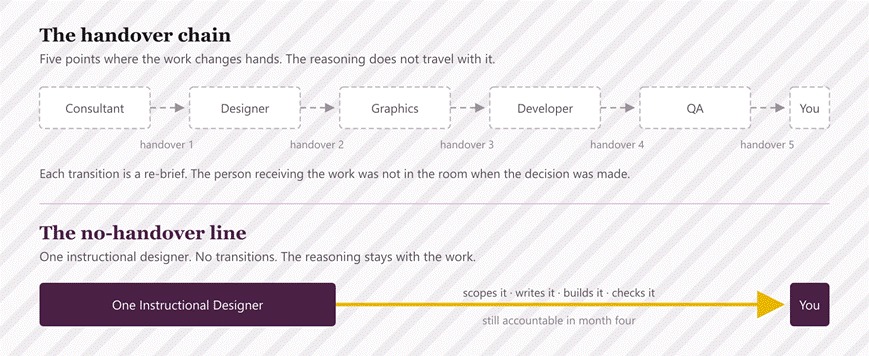
The handover chain versus the no-handover line. Reused verbatim from earlier posts. Alt text: Four-step handover chain from instructional designer to graphics to developer to QA to you, shown greyed and dashed, above a single unbroken gold line from instructional designer straight to you.
The greyed chain above shows the usual path, from designer to graphics to developer to QA, then to you. The gold line below shows the alternative, where the designer who interviewed the trainer also writes, builds and checks the course. The facilitator’s knowledge reaches the learner without being re-briefed four times.
For a Director of Programs, that means sitting the conversion designer in on a live session before the storyboard starts.
Which Courses to Convert First
Convert first the courses where online delivery saves the most and loses the least. A training manager can rank a catalogue with five tests and a spreadsheet, before any vendor is involved.
- Is the content stable for at least two years? Unstable content means paying to convert twice.
- Is it delivered repeatedly to many learners? Volume is where travel and trainer time savings come from.
- Is it mostly knowledge and process, rather than live interpersonal skill? Knowledge converts well.
- Can practice be built as scenarios with clear right and wrong answers? If yes, eLearning can replace the role-play.
- Is a subject-matter expert available to answer questions during the redesign? Without one, the build stalls.
Courses that pass all five go first. Courses that fail the third or fourth often suit a blended design or virtual instructor-led training instead.
A licensing school converting a pre-exam course usually passes all five. A leadership workshop built on live peer coaching usually fails two.
>> Tell Julian which courses are on your list and get a straight read on which to convert first
Questions to Ask Any Learning Partner Before a Conversion
Five questions show whether a partner will redesign your course or just repackage it. A handover-model firm usually fails at least three. An L&D Manager should send them in writing before scoping calls.
- Will the designer who analyses our classroom course also write and build the eLearning?
- How will you replace the facilitator’s explanations and corrections, module by module?
- Which parts of our course do you recommend not converting, and why?
- How will you test SCORM or xAPI tracking in our LMS before launch, and who fixes failures?
- Who owns the source files when the project ends?
LMS compatibility is the buyer-scorecard question the fourth one answers. A converted course that does not record completions properly creates a reporting problem worse than the classroom one it replaced.
VonGeyer Consulting is an Instructional Design House, meaning a firm where the designers who scope a course also write it, build it and check it. One named Senior Instructional Designer answers all five questions for the life of the project.
What Conversion Costs, and What Drives It
Conversion costs are driven by how much interactivity the redesign needs, not by how many slides the deck had. TrainingCost.com’s 2026 analysis, adjusting the Chapman Alliance study for inflation, gives three bands per finished hour.
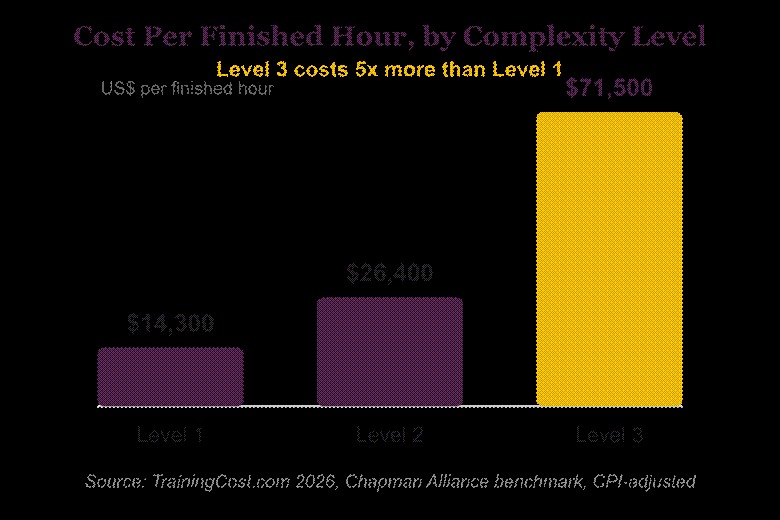
Cost per finished hour of eLearning, inflation-adjusted Chapman bands: about $14,300 at Level 1, $26,400 at Level 2, $71,500 at Level 3. TrainingCost.com, 2026. Reused from post 4. Alt text: Bar chart of cost per finished hour rising steeply with complexity level.
The chart shows those three bands. A Level 1 course with basic interaction costs about $14,300 per finished hour. A Level 2 interactive course costs about $26,400, and a Level 3 simulation about $71,500.
Here is a worked illustration, with the assumption stated. Take a two-day workshop and assume the redesign keeps three hours of finished eLearning, moving the rest to job aids.
| Redesign mix (assumed) | Benchmark cost |
| 3 hours at Level 1 | ~$42,900 |
| 2 hours at Level 1, 1 hour at Level 2 | ~$55,000 |
| 3 hours at Level 2 | ~$79,200 |
These are industry benchmarks, not a quote. They show why the redesign decision, how much practice and at what level, moves the budget far more than the deck size does.
Source: [TrainingCost.com, eLearning Development Cost, 2026](https://trainingcost.com/elearning-development-cost)
When to Keep a Course in the Classroom
Keep a course in the classroom when the learning depends on live human interaction that a screen cannot replace. Negotiation practice, sensitive conversations and hands-on equipment training are the usual examples.
Virtual instructor-led training is often the better middle path. It keeps the facilitator and removes the travel, which suits a training manager whose problem is logistics rather than design.
A good partner will also tell you when the content itself is the problem. Converting an out-of-date workshop only produces an out-of-date eLearning course.
Where this doesn’t apply
VonGeyer does not deliver live facilitation or run virtual classrooms, so a straight move to virtual instructor-led training is better handled by your trainers. Native mobile apps are outside scope, translation is priced separately, and VonGeyer is not the right fit for a 10,000-seat conversion needed this month.
For courses that do convert, the strongest evidence a partner can offer is a large conversion delivered by the same people. VonGeyer rebuilt a 90-hour US real estate licensure course audio-first in five months, because learners studied in their cars. It was delivered in monthly work packages into the client’s own LCMS.
What Changes When Conversion Is Treated as Redesign
ILT to eLearning conversion pays off when it is treated as a redesign with one accountable owner. For an L&D Manager, that means a catalogue that reaches more learners without losing what the trainers taught. It also avoids a second job managing the vendor.
>> Talk to Julian about converting your first three courses, and which to leave in the classroom
FAQ
How do you convert instructor-led training to eLearning?
Start by observing the live course and interviewing the trainer, then decide what to keep, cut or move to job aids. Redesign each facilitator task as content, practice or feedback, build it in an authoring tool, and test tracking in the LMS before launch.
How long does it take to convert ILT to eLearning?
It depends on the finished length and how interactive the course must be. Simple knowledge courses can convert in weeks, while scenario-heavy courses take months. Content that is still changing adds the most time, so settle it before the build starts.
How much does it cost to convert ILT to eLearning?
Cost follows the complexity of the finished course, not the number of slides. Industry benchmarks put one finished hour at about $14,300 for basic interaction, about $26,400 for interactive courses and about $71,500 for simulations, adjusted for inflation.
What is the difference between ILT and VILT?
ILT is instructor-led training delivered in a physical classroom. VILT is instructor-led training delivered live online through a virtual classroom. Both keep a live facilitator, whereas eLearning is self-paced and replaces the facilitator with designed content and feedback.
Can all classroom training be converted to eLearning?
No. Knowledge and process content converts well, and so does practice that can be built as scenarios. Skills that depend on live human interaction or physical equipment usually need a classroom, virtual session or blended design instead.
