
AI in instructional design now speeds up outlining, first drafts, question writing and narration, while the design decisions still need a human. The courses that improve are the ones where AI saves production time and an accountable designer checks every line it touches.
For an L&D Manager buying custom courses, the useful question is not whether a vendor uses AI. It is where the AI sits and who reviews its output.
Almost everyone uses it now. ATD Research’s July 2025 study of 232 instructional designers found 80% use AI tools while designing courses.
That makes AI use a baseline, not a differentiator. What separates vendors is what they tell you about it.
| AI in instructional design (definition) AI in instructional design means using generative AI tools to support course creation: outlining, drafting, writing assessment items, producing narration and summarising source material. In a corporate L&D buying context, the design choices, the accuracy check and the accountability for the finished course remain with a named human designer. |
TL;DR
- AI in instructional design speeds up drafting, question writing and narration; humans still make the design decisions.
- It matters to L&D Managers and procurement leads buying custom courses in 2026.
- 80% of instructional designers now use AI, so using it is no longer a selling point.
- The real risk is unreviewed output and client content entering a language model.
- AI cuts production cost; it does not cut the cost of instructional judgment.
- Ask any vendor five questions about AI before you sign.
- The No-Handover Check adds one line every buyer should demand: what AI did.
>> See how AI voice was used at 90-hour scale with a human check on every take
Table of Contents
1. How Instructional Designers Actually Use AI Now
2. Where AI Saves Time, and Where It Doesn’t
3. Why AI Doesn’t Lower the Cost of Good Courses
4. What Your Vendor Should Tell You About AI
5. The No-Handover Check, With an AI Line
6. When an AI Course Tool Is Enough on Its Own
7. FAQ
How Instructional Designers Actually Use AI Now
Instructional designers mostly use AI for drafting and production support, not for analysing learners. ATD’s study found AI most common for outlining, storyboarding, writing learning objectives and narration.
Use falls away for the work closest to judgment. Only 21% always or often use AI to develop learner personas, and only 19% use it to analyse learner data.
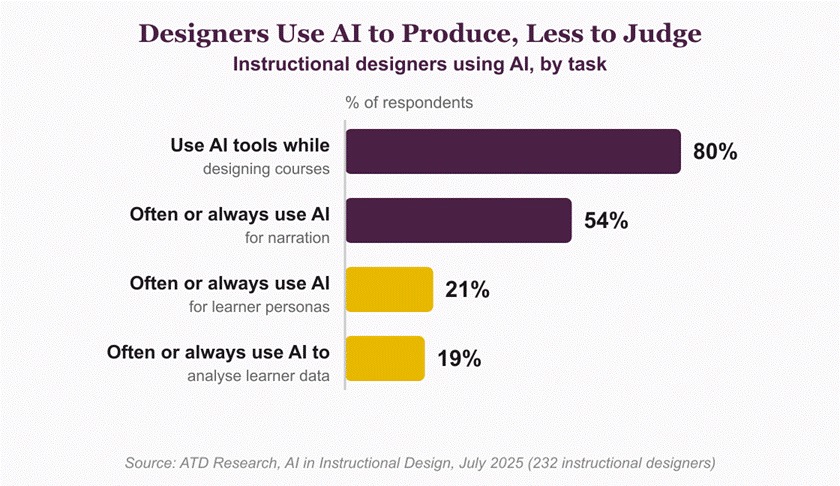
How instructional designers use AI, by task: 80% use AI while designing courses, 54% often or always for narration, 21% for learner personas, 19% to analyse learner data. ATD Research, July 2025, 232 instructional designers. Alt text: Horizontal bar chart with the two judgment tasks highlighted in gold.
The chart compares four findings from ATD’s 2025 survey of 232 instructional designers. 80% use AI tools while designing courses, and 54% often or always use AI for narration.
Only 21% often or always use it for learner personas, and 19% for analysing learner data.
Source: [ATD Research, AI in Instructional Design, July 2025](https://www.td.org/content/atd-blog/instructional-design-in-the-age-of-ai)
For an L&D Manager, that pattern is reassuring and a warning at once. Designers use AI where it is safe to check. The risk sits with vendors who extend it into decisions without saying so.
Where AI Saves Time, and Where It Doesn’t
AI saves time on first drafts and repetitive production. It saves little on the work that decides whether a course changes behaviour: analysis, scenario design and review.
Buyers expect the savings. TalentLMS’s 2026 L&D report found 88% of HR managers expect generative AI to change the time needed to create learning content. The table shows where that expectation holds.
| Task | What AI does well | What still needs the designer |
| Research and source summaries | Fast first pass over long documents | Checking accuracy against the source |
| Outlines and objectives | Drafts structure in minutes | Choosing what the learner must do differently |
| Assessment items | Generates question banks | Making wrong answers realistic, not obvious |
| Narration | Produces voice at scale | Listening to every take for errors |
| Scenarios | Suggests situations | Building the decision and its consequences |
| Review | Flags typos and inconsistencies | Judging whether the course works |
A Director of Programs at a licensing school should read that right-hand column as the price of quality. If a quote shrinks the right-hand work, the course will shrink with it.
Why AI Doesn’t Lower the Cost of Good Courses
The assumption is that AI turns course design into a low-cost commodity. The reality is that AI cuts production cost, and judgment becomes the scarce part.
When drafts cost almost nothing, the bottleneck moves to review. Someone still has to decide what the course must achieve, check every AI-written line and approve it. In a handover-model firm, that check is spread across people who each see one piece.
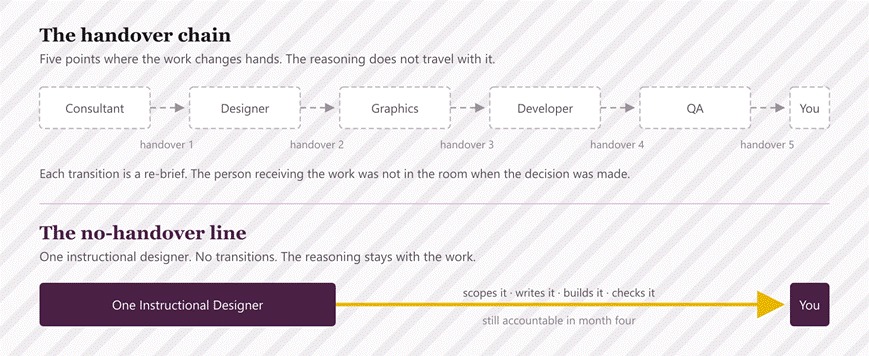
The handover chain versus the no-handover line. Reused verbatim from earlier posts. Alt text: Four-step handover chain from instructional designer to graphics to developer to QA to you, shown greyed and dashed, above a single unbroken gold line from instructional designer straight to you.
The greyed chain above shows the usual path, from designer to graphics to developer to QA, then to you. The gold line below it shows the alternative, where the designer who scoped the course also builds and checks it. With AI in the workflow, that single owner is also the person who reviews what the AI produced.
For an L&D Manager comparing quotes, a much lower AI-led bid usually means less review, not better tooling. Ask which right-hand tasks from the table above it removed.
What Your Vendor Should Tell You About AI
A vendor should be able to state, in writing, where AI is used, what client data it touches and who reviews its output. If the answer is vague, the AI policy does not exist.
Data and AI handling is the buyer-scorecard question this section answers. Procurement and an L&D Manager should put these five questions to every shortlisted partner.
- Which tasks in our project will use AI, and which will not?
- Will any of our content, documents or recordings be entered into a language model?
- Who reviews every AI-generated line, image and voice take before we see it?
- If AI voice is used, how is each take checked, and who owns the audio files?
- Do we own the source files, including anything AI helped produce?
VonGeyer’s answer to the second question is no. We use AI for research, gap-filling, question banks, voice and first-pass translation. We do not use it to write whole scripts, and we do not put client content into a language model.
>> Ask Julian how AI would and would not be used on your project
The No-Handover Check, With an AI Line
The No-Handover Check is five lines any buyer can ask a vendor to fill in for a past project. A handover-model firm answering honestly writes four or five different names. The fourth line, what AI did, is the one most vendors now struggle to answer plainly.
The No-Handover Check
- Who designed it: a named Senior Instructional Designer
- Who built it: the same designer, in the authoring tool
- Who checked it: the same designer, against standards owned by the Head of Design Strategy
- What AI did: research, question banks and voice, with every output reviewed by the designer
- Who owned the engagement: the same named Senior Instructional Designer, first call to final upload
Here is how that worked at scale. On a 90-hour US real estate licensure course, VonGeyer used AI voice production with a human check on every take, and no AI script generation.
VonGeyer is an Instructional Design House, meaning a firm where the designers who scope the work also write it, build it and check it. That is why the AI line has a single owner.
When an AI Course Tool Is Enough on Its Own
An AI course generator is enough when the content is simple, internal and low-risk, and nobody’s performance depends on it. A short explainer of a new expense tool, read once and rarely revisited, fits that description.
It is not enough when the course must change a decision, carries regulatory weight or is the product you sell. A Director of Programs whose learners sit a licensing exam needs designed practice, not generated pages.
An honest partner will tell you which of your courses fall into which group. Many catalogues hold both.
Where this doesn’t apply
VonGeyer does not sell or resell AI course-generation software, and it is not the lowest-cost route to a simple internal explainer. Native mobile apps and live facilitation are outside scope, and translation beyond first-pass AI drafts is priced separately.
If most of your backlog is simple internal content, an AI tool and a reviewer inside your team may be the right answer. Use a design partner for the courses that carry risk.
What Changes When AI Has One Accountable Owner
AI in instructional design is now normal. What changes your results is whether one accountable designer owns both the design and the review of everything AI produced. For a stretched L&D team, that means faster courses without a second job checking the vendor’s machine output.
>> Talk to Julian about where AI would save time on your next course, and where it wouldn’t
FAQ
What is the role of AI in instructional design?
AI supports instructional designers with research, outlining, first drafts, question writing and narration. It speeds up production. The designer still decides what the learner must do differently, checks accuracy and stays accountable for the finished course.
Can AI create an eLearning course on its own?
AI tools can generate a basic course from a document, and that can be enough for simple, low-risk internal content. Courses that must change behaviour, meet regulatory standards or prepare people for exams still need a designer to build the practice and check every line.
What are the best AI tools for instructional designers?
Designers commonly use general language models for drafting and outlining, and AI voice tools for narration. Authoring tools such as Articulate 360 now include AI features too. The best tool depends on the task, and every output still needs human review.
Is AI-generated training content accurate?
Not reliably. AI can produce confident errors, outdated facts and plausible but wrong answer options. Every AI-generated line, image and voice take needs a review by someone who knows the subject and the learning goal.
Should you put company content into AI tools when building training?
Only under a clear policy that your legal and security teams have approved. Many design partners, including VonGeyer, choose not to enter client content into language models at all. They use AI only for tasks that do not need it.
