
Choose Articulate Rise 360 when the course is mostly information that must reflow on any screen and ship fast. Choose Storyline 360 when the learning experience is the interaction, such as branching, simulations or graded scenarios with custom logic.
For an L&D Manager or Director of Programs briefing a vendor, the choice also decides who can edit the course in eighteen months. Both tools sit inside one Articulate 360 AI subscription, listed at $1,749 per seat per year, so the licence rarely decides anything. What decides it is the interaction you need and who will hold the source file.
| Short answer Pick Rise for information-led courses that need to reflow on any screen and be updated quickly, and pick Storyline when triggers, variables and branching drive the learning. Rise is the wrong choice when the course needs custom logic, and Storyline is the wrong choice when non-specialists must maintain a phone-friendly course. Teams switch when a Rise course hits its interaction ceiling, or when a Storyline course becomes too costly to keep current. |
TL;DR
- Rise 360 is a browser-based, block-built tool that reflows on any screen. Storyline 360 is a slide-based desktop tool built around triggers and variables.
- Rise suits information-led courses. Storyline suits branching, simulation and custom scoring.
- Both are included in one Articulate 360 subscription, so licence cost rarely separates them.
- The real cost is design hours: one assumed 40-hour rebuild costs more than a seat.
- Rise has no exportable source file, so a Rise course stays editable only while a subscription is active.
- Five No-Handover Check questions show who chose the tool, who builds in it and who owns the source.
- The next step is to decide by the interaction you need, then confirm in writing who holds the source.
>> See what a full engagement actually looked like, from first call to final upload
Table of Contents
1. Storyline vs Rise: What Actually Differs?
2. Which Tool Should You Use for Your Course?
3. Does Storyline vs Rise Change the Cost?
4. Why the Feature List Is the Wrong Way to Choose
5. The No-Handover Check for Your Authoring Tool
6. Where This Advice Doesn’t Apply
7. What Good Looks Like
8. FAQ
Storyline vs Rise: What Actually Differs?
Rise 360 and Storyline 360 are two separate Articulate products, not two versions of one. Rise is a browser-based, block-built tool whose courses reflow on any screen. Storyline is a slide-based desktop tool built around triggers, variables and states.
Both publish to an LMS as SCORM, xAPI or cmi5.
A Learning Manager comparing them is really comparing two authoring models. One assembles prebuilt blocks quickly, and the other builds every interaction from a blank canvas. That is why the two are not interchangeable, even though a subscription includes both.
Articulate is the company and the subscription, and Rise is one tool inside it. The table sets out the differences a buyer can verify against Articulate’s own documentation.
| Criterion | Rise 360 | Storyline 360 |
| Authoring model | Browser-based, built block by block | Desktop app, built slide by slide on a canvas |
| Screen behaviour | Fully responsive, content reflows | Fixed-aspect slides scale to fit, with a responsive player |
| Interactivity | Prebuilt blocks and a scenario block, no triggers | Triggers, variables, states and layers |
| Branching | Basic, through the scenario block | Full branching driven by variables |
| Publish formats | SCORM, xAPI, cmi5, AICC | SCORM, xAPI, cmi5, AICC |
| Editable source | Stays inside the Articulate account | A project file you can store |
| Accessibility claim | WCAG 2.1 Level AA, per Articulate | Section 508 and WCAG support, per Articulate |
Which Tool Should You Use for Your Course?
Use Rise when the learner mainly reads, watches and checks understanding. Use Storyline when the learner must decide, practise or be scored on what they do. That single test settles most cases.
A Director of Programs refreshing forty compliance modules needs Rise’s speed. A safety trainer who needs a branching incident simulation needs Storyline. Four questions, asked in this order, make the call before anyone opens either tool.
- Does the learner make decisions whose consequences change later screens? If yes, choose Storyline.
- Does the course need custom scoring, variables or scripted logic? If yes, choose Storyline.
- Must the course reflow on a phone and be edited by non-specialists? If yes, choose Rise.
- Is it mostly information with knowledge checks? Choose Rise.
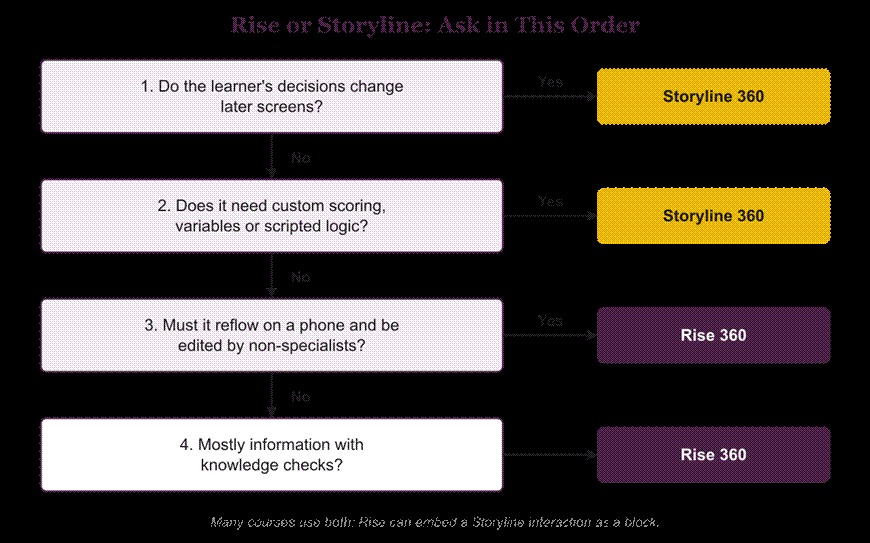
Decision tree mirroring the four numbered questions above. Alt text: Decision tree, Storyline 360 if decisions change later screens or custom logic is needed, Rise 360 if it must reflow and be edited by non-specialists or is mostly information.
Many courses use both. Rise can embed a Storyline interaction as a block, which puts one branching scenario inside an otherwise fast Rise course. The trade-off is two source files to keep, which matters again in the ownership section below.
An L&D Manager should also decide who tests the embedded scenario inside the LMS before launch.
Does Storyline vs Rise Change the Cost?
The licence does not separate them. Articulate lists the 360 AI plan, which includes both tools, at $1,749 per seat per year, with a discounted $1,198 offer showing in September 2026. Design hours are where the cost sits.
Consider what a wrong choice costs. Robert Half’s 2026 data puts the US instructional designer midpoint salary at $96,500, roughly $46 an hour before benefits. We assume a 40-hour rebuild for illustration, which is about $1,856 of designer time and already more than one seat.
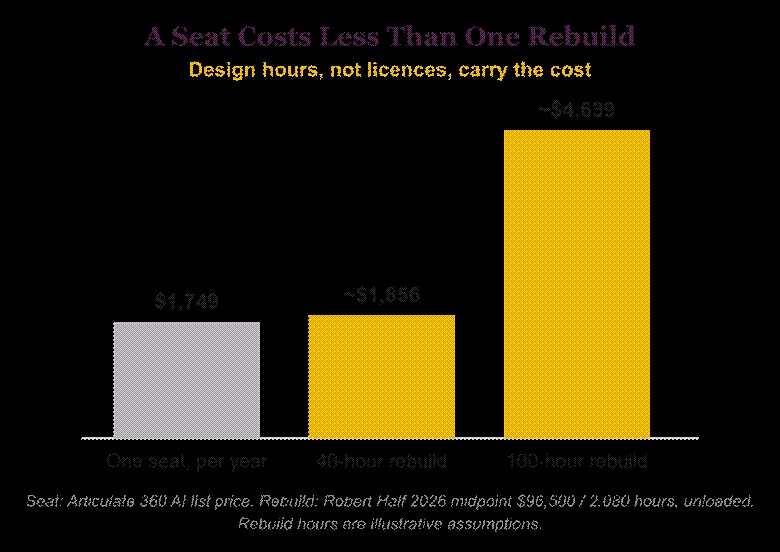
One Articulate 360 AI seat versus a 40-hour and 100-hour rebuild. Rebuild hours are illustrative assumptions; pay is the Robert Half 2026 midpoint, unloaded.
The chart shows one seat at $1,749, a 40-hour rebuild at about $1,856 and a 100-hour rebuild at about $4,639. All three use unloaded midpoint pay.
ATD’s 2026 State of the Industry report puts average direct learning spend at $846 per employee for 2025, down from $1,254. When budgets shrink like that, a rebuild is money an L&D Manager rarely has.
Why the Feature List Is the Wrong Way to Choose
The assumption is that you choose the tool by comparing features. The reality is that the tool decides who can maintain the course after launch.
Rise is web-based and stores content on Articulate’s servers. Articulate’s own community guidance confirms there is no way to export an editable Rise source file. Keeping a Rise course editable means keeping an active Articulate 360 subscription.
A Storyline project saves as a project file, so the client can hold the source themselves. That difference is invisible on launch day and expensive two years later, when the original designer has moved on.
For a Director of Programs, this is source-file ownership, one of the twelve criteria worth scoring any vendor on. Ask where the editable course will live, whose account holds it, and what happens if the subscription lapses. The answer belongs in the contract.
From the desk
Ask the vendor to share every Rise course into your own Articulate 360 workspace at handover. Ask for the project file of every Storyline interaction as well. Put both in the statement of work, not in an email.
The No-Handover Check for Your Authoring Tool
A vendor’s tool choice tells you how their work is organised. If the person recommending Storyline never sees the finished build, the recommendation is a guess. Five questions expose the difference before you sign anything.
The No-Handover Check, applied to tool choice
- Who chose the tool: the designer who scoped the course, or a developer who saw it after the storyboard?
- Who builds in it: the person who wrote the script?
- Who tests accessibility and LMS playback before it reaches you?
- What did AI do in the build, and who reviewed every line it generated?
- Who owns the editable source: your account, or the vendor’s?
A handover-model firm answering honestly writes four different names. At VonGeyer Consulting, one named Senior ID answers all five. VonGeyer is an Instructional Design House, meaning a firm where the designers who scope the work also write it, build it and check it.
Our designers build in both tools. We use AI for research, gap-filling and question banks, not to write whole scripts, and we do not put your content into a language model.
>> See who would actually own your build before you commit to a tool
Where This Advice Doesn’t Apply
This is a buyer’s guide, not a Storyline training course. The advice above assumes you are commissioning a course or choosing a build partner, not learning to build one yourself. A team that already has a trained developer and a stable tool standard needs a different conversation.
Where this doesn’t apply
VonGeyer does not teach either tool and does not resell licences. It is not the right fit for a single course your own team plans to build in-house. A small senior team also cannot absorb a 10,000-seat rollout needing five specialists this month. Neither tool produces a native mobile app, and translation is priced separately.
If your team builds in-house and only needs tool skills, Articulate’s own documentation is the better route. If you are weighing a build partner, the question is what the tool choice changes for you, not which button to press.
What Good Looks Like
The clearest proof that the right person chose the tool is a project that shipped faster than the category norm without adding people. VonGeyer scripted, designed and built 20 hours of learning in 45 days. The roughly 4-month industry baseline for that volume shows what the coordination layers usually cost.
The same senior designer who scoped the format was still accountable in month two.
A Director of Programs choosing between vendors should ask for exactly this. Ask for a timeline with a named person on every stage, including the decision about which tool to build in. If no name sits against that decision, nobody owned it.
What Changes When You Choose the Tool for the Right Reason
Choosing between Storyline and Rise is a decision about interaction, maintenance and ownership, not licence cost. For a stretched L&D team, the right choice means capacity that keeps courses current without a second management job looking after the vendor. Get it wrong and the cost is a rebuild, plus a course nobody in your team can edit.
>> Talk to Julian about which tool your course needs and who should hold the source
FAQ
Is Rise the same as Articulate?
No. Articulate is the company and the Articulate 360 subscription. Rise 360 is one of the authoring tools inside that subscription, alongside Storyline 360. Rise is browser-based and block-built, while Storyline is a desktop tool built around triggers and variables.
Is Articulate Storyline still available?
Yes. Storyline 360 is current and is included in the Articulate 360 subscription, alongside Rise 360. Check Articulate’s pricing page for the current plan and offer before budgeting.
Is quiz making as easy in Storyline as it is in Rise?
Rise is faster for standard knowledge checks because quizzes are prebuilt blocks. Storyline takes longer but gives more control, including custom feedback, scoring driven by variables and branching on results. Choose Rise for quick checks and Storyline when the score must change what happens next.
Can you use Storyline and Rise together?
Yes. Rise can embed a Storyline interaction as a block, so a fast Rise course can carry one branching scenario built in Storyline. The trade-off is two source files to maintain.
Does Articulate Rise export to SCORM?
Yes. Articulate states that Rise 360 courses export as cmi5, xAPI, SCORM or AICC packages that work with an LMS. Storyline 360 also publishes to SCORM, xAPI and AICC. Confirm your LMS version supports the standard you choose before the build starts.
